Master Text-to-Speech with Voice Design, Narration & Audio Production Prompts
Written by Adnan Khan Published July 25, 2026 Updated Oct 18, 2026 10 min read
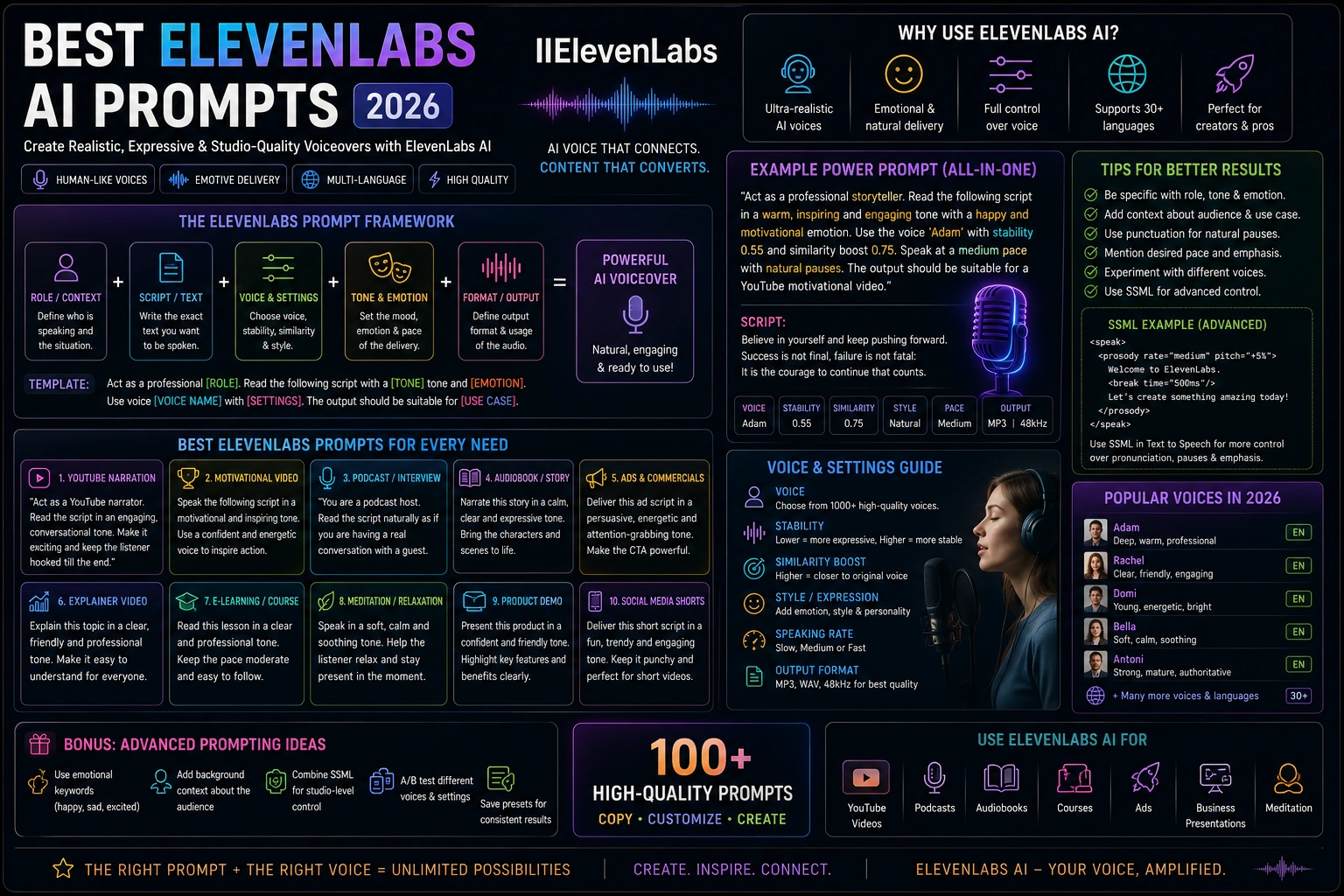
Supercharge your audio projects with 50 meticulously crafted prompts for ElevenLabs. From designing unique custom voices and narrating immersive audiobooks to creating dynamic character dialogues, professional podcast intros, and global multilingual content, these prompts leverage the full range of ElevenLabs' text-to-speech and voice cloning capabilities. Each template is ready to use just fill in your content, pick a voice, and generate studio-quality speech in seconds.
Updated for 2026 AI Tools Tested Prompt Templates Beginner Friendly Free to Copy & Use
Select a category or browse all ElevenLabs prompts below
1. Emotion-Aware AI Customer Agent
VOICE DESIGN
Human-like support voice that adapts naturally to customer emotion.
Design a highly natural customer support voice for [brand], warm and confident with emotionally responsive delivery. Sound reassuring when the customer is frustrated, energetic when resolving a problem, and calm during explanations. Use natural pauses, conversational pacing and subtle empathy without sounding scripted.
Design a highly natural customer support voice for [brand], warm and confident with emotionally responsive delivery. Sound reassuring when the customer is frustrated, energetic when resolving a problem, and calm during explanations. Use natural pauses, conversational pacing and subtle empathy without sounding scripted.
Recommended Tech Stack
ElevenLabs Text to Speech / Voice Design; ElevenLabs Sound Effects or Voice Changer where relevant; Audacity for cleanup; Adobe Premiere Pro or DaVinci Resolve for final editing.
Quick Implementation Guide
Paste the prompt or source script into the appropriate ElevenLabs tool. Specify intended audience, emotional tone, pacing, accent or language, pronunciation notes, and context; use performance cues such as [whispering] or [excited] only where supported by the selected model.
Generate a short test first. Adjust available controls such as stability, similarity/clarity, and style to suit the voice and model; settings and labels vary by tool, so compare a few versions instead of assuming one preset works for every voice.
Listen for mispronunciations, clipped words, unnatural pauses, and inconsistent loudness. Export the chosen audio, then edit and sync it in Audacity, Premiere Pro, or DaVinci Resolve; confirm usage rights before publishing.
Real-World Use Case Example
Create a consistent assistant, creator, or presenter voice for videos, podcasts, customer experiences, and other spoken-content projects.
2. Viral Short-Form Creator Voice
VOICE DESIGN
Fast, expressive narration designed for Shorts, Reels and TikTok-style content.
Create a highly engaging creator voice for short-form videos about [topic]. Young, confident and conversational with fast but intelligible pacing, strong opening energy, natural emphasis, quick emotional shifts and occasional playful reactions. Make it feel spontaneous rather than like a traditional announcer.
Create a highly engaging creator voice for short-form videos about [topic]. Young, confident and conversational with fast but intelligible pacing, strong opening energy, natural emphasis, quick emotional shifts and occasional playful reactions. Make it feel spontaneous rather than like a traditional announcer.
Recommended Tech Stack
ElevenLabs Text to Speech / Voice Design; ElevenLabs Sound Effects or Voice Changer where relevant; Audacity for cleanup; Adobe Premiere Pro or DaVinci Resolve for final editing.
Quick Implementation Guide
Paste the prompt or source script into the appropriate ElevenLabs tool. Specify intended audience, emotional tone, pacing, accent or language, pronunciation notes, and context; use performance cues such as [whispering] or [excited] only where supported by the selected model.
Generate a short test first. Adjust available controls such as stability, similarity/clarity, and style to suit the voice and model; settings and labels vary by tool, so compare a few versions instead of assuming one preset works for every voice.
Listen for mispronunciations, clipped words, unnatural pauses, and inconsistent loudness. Export the chosen audio, then edit and sync it in Audacity, Premiere Pro, or DaVinci Resolve; confirm usage rights before publishing.
Real-World Use Case Example
Create a consistent assistant, creator, or presenter voice for videos, podcasts, customer experiences, and other spoken-content projects.
3. Multi-Speaker AI Podcast
VOICE DESIGN
Natural co-host voices designed for realistic AI-generated conversations.
Design a natural podcast host voice for [topic]. Intelligent, relaxed and expressive, with realistic conversational timing, brief pauses, spontaneous reactions, subtle laughter and varied emphasis. The voice should respond naturally to another speaker instead of sounding like isolated narration.
Design a natural podcast host voice for [topic]. Intelligent, relaxed and expressive, with realistic conversational timing, brief pauses, spontaneous reactions, subtle laughter and varied emphasis. The voice should respond naturally to another speaker instead of sounding like isolated narration.
Recommended Tech Stack
ElevenLabs Text to Speech / Voice Design; ElevenLabs Sound Effects or Voice Changer where relevant; Audacity for cleanup; Adobe Premiere Pro or DaVinci Resolve for final editing.
Quick Implementation Guide
Paste the prompt or source script into the appropriate ElevenLabs tool. Specify intended audience, emotional tone, pacing, accent or language, pronunciation notes, and context; use performance cues such as [whispering] or [excited] only where supported by the selected model.
Generate a short test first. Adjust available controls such as stability, similarity/clarity, and style to suit the voice and model; settings and labels vary by tool, so compare a few versions instead of assuming one preset works for every voice.
Listen for mispronunciations, clipped words, unnatural pauses, and inconsistent loudness. Export the chosen audio, then edit and sync it in Audacity, Premiere Pro, or DaVinci Resolve; confirm usage rights before publishing.
Real-World Use Case Example
Create a consistent assistant, creator, or presenter voice for videos, podcasts, customer experiences, and other spoken-content projects.
4. Emotional Audiobook Character
VOICE DESIGN
Expressive storytelling voice with dynamic emotion and consistent character identity.
Create an emotionally expressive audiobook character voice for [character]. Warm, distinctive and immersive, capable of shifting naturally between calm reflection, excitement, fear, sadness and quiet intensity. Maintain the same vocal identity while changing emotional delivery between scenes.
Create an emotionally expressive audiobook character voice for [character]. Warm, distinctive and immersive, capable of shifting naturally between calm reflection, excitement, fear, sadness and quiet intensity. Maintain the same vocal identity while changing emotional delivery between scenes.
Recommended Tech Stack
ElevenLabs Text to Speech / Voice Design; ElevenLabs Sound Effects or Voice Changer where relevant; Audacity for cleanup; Adobe Premiere Pro or DaVinci Resolve for final editing.
Quick Implementation Guide
Paste the prompt or source script into the appropriate ElevenLabs tool. Specify intended audience, emotional tone, pacing, accent or language, pronunciation notes, and context; use performance cues such as [whispering] or [excited] only where supported by the selected model.
Generate a short test first. Adjust available controls such as stability, similarity/clarity, and style to suit the voice and model; settings and labels vary by tool, so compare a few versions instead of assuming one preset works for every voice.
Listen for mispronunciations, clipped words, unnatural pauses, and inconsistent loudness. Export the chosen audio, then edit and sync it in Audacity, Premiere Pro, or DaVinci Resolve; confirm usage rights before publishing.
Real-World Use Case Example
Create a consistent assistant, creator, or presenter voice for videos, podcasts, customer experiences, and other spoken-content projects.
5. Real-Time AI Sales Agent
VOICE DESIGN
Responsive sales voice designed for natural two-way conversations.
Design a real-time AI sales agent voice for [business]. Confident, friendly and persuasive without being aggressive. Use short natural pauses, responsive turn-taking, subtle enthusiasm and clear explanations. Become more reassuring when handling objections and more energetic when presenting relevant benefits.
Design a real-time AI sales agent voice for [business]. Confident, friendly and persuasive without being aggressive. Use short natural pauses, responsive turn-taking, subtle enthusiasm and clear explanations. Become more reassuring when handling objections and more energetic when presenting relevant benefits.
Recommended Tech Stack
ElevenLabs Text to Speech / Voice Design; ElevenLabs Sound Effects or Voice Changer where relevant; Audacity for cleanup; Adobe Premiere Pro or DaVinci Resolve for final editing.
Quick Implementation Guide
Paste the prompt or source script into the appropriate ElevenLabs tool. Specify intended audience, emotional tone, pacing, accent or language, pronunciation notes, and context; use performance cues such as [whispering] or [excited] only where supported by the selected model.
Generate a short test first. Adjust available controls such as stability, similarity/clarity, and style to suit the voice and model; settings and labels vary by tool, so compare a few versions instead of assuming one preset works for every voice.
Listen for mispronunciations, clipped words, unnatural pauses, and inconsistent loudness. Export the chosen audio, then edit and sync it in Audacity, Premiere Pro, or DaVinci Resolve; confirm usage rights before publishing.
Real-World Use Case Example
Create a consistent assistant, creator, or presenter voice for videos, podcasts, customer experiences, and other spoken-content projects.
6. Multilingual Creator Voice
VOICE DESIGN
Consistent creator voice for multilingual videos and international audiences.
Design a modern creator voice for [creator/brand] that remains recognizable across [languages]. Friendly, energetic and emotionally expressive with clear pronunciation, natural regional delivery and consistent personality. Preserve the speaker's tone, pacing and emotional intent when switching languages.
Design a modern creator voice for [creator/brand] that remains recognizable across [languages]. Friendly, energetic and emotionally expressive with clear pronunciation, natural regional delivery and consistent personality. Preserve the speaker's tone, pacing and emotional intent when switching languages.
Recommended Tech Stack
ElevenLabs Text to Speech / Voice Design; ElevenLabs Sound Effects or Voice Changer where relevant; Audacity for cleanup; Adobe Premiere Pro or DaVinci Resolve for final editing.
Quick Implementation Guide
Paste the prompt or source script into the appropriate ElevenLabs tool. Specify intended audience, emotional tone, pacing, accent or language, pronunciation notes, and context; use performance cues such as [whispering] or [excited] only where supported by the selected model.
Generate a short test first. Adjust available controls such as stability, similarity/clarity, and style to suit the voice and model; settings and labels vary by tool, so compare a few versions instead of assuming one preset works for every voice.
Listen for mispronunciations, clipped words, unnatural pauses, and inconsistent loudness. Export the chosen audio, then edit and sync it in Audacity, Premiere Pro, or DaVinci Resolve; confirm usage rights before publishing.
Real-World Use Case Example
Create a consistent assistant, creator, or presenter voice for videos, podcasts, customer experiences, and other spoken-content projects.
7. AI Receptionist with Memory
VOICE DESIGN
Professional receptionist voice designed for ongoing customer conversations.
Design a professional AI receptionist voice for [business]. Warm, attentive and highly natural. Speak clearly while remembering conversational context, acknowledging returning customers naturally, asking concise follow-up questions and smoothly escalating complex requests to a human when necessary.
Design a professional AI receptionist voice for [business]. Warm, attentive and highly natural. Speak clearly while remembering conversational context, acknowledging returning customers naturally, asking concise follow-up questions and smoothly escalating complex requests to a human when necessary.
Recommended Tech Stack
ElevenLabs Text to Speech / Voice Design; ElevenLabs Sound Effects or Voice Changer where relevant; Audacity for cleanup; Adobe Premiere Pro or DaVinci Resolve for final editing.
Quick Implementation Guide
Paste the prompt or source script into the appropriate ElevenLabs tool. Specify intended audience, emotional tone, pacing, accent or language, pronunciation notes, and context; use performance cues such as [whispering] or [excited] only where supported by the selected model.
Generate a short test first. Adjust available controls such as stability, similarity/clarity, and style to suit the voice and model; settings and labels vary by tool, so compare a few versions instead of assuming one preset works for every voice.
Listen for mispronunciations, clipped words, unnatural pauses, and inconsistent loudness. Export the chosen audio, then edit and sync it in Audacity, Premiere Pro, or DaVinci Resolve; confirm usage rights before publishing.
Real-World Use Case Example
Create a consistent assistant, creator, or presenter voice for videos, podcasts, customer experiences, and other spoken-content projects.
8. Cinematic Character Performance
VOICE DESIGN
Film and game character voice designed around emotional performance.
Create a cinematic character voice for [character]. Give the character a distinctive vocal identity with subtle emotional changes, natural breaths, dramatic pauses and believable reactions. The performance should shift between [emotion 1], [emotion 2] and [emotion 3] while maintaining the same recognizable character.
Create a cinematic character voice for [character]. Give the character a distinctive vocal identity with subtle emotional changes, natural breaths, dramatic pauses and believable reactions. The performance should shift between [emotion 1], [emotion 2] and [emotion 3] while maintaining the same recognizable character.
Recommended Tech Stack
ElevenLabs Text to Speech / Voice Design; ElevenLabs Sound Effects or Voice Changer where relevant; Audacity for cleanup; Adobe Premiere Pro or DaVinci Resolve for final editing.
Quick Implementation Guide
Paste the prompt or source script into the appropriate ElevenLabs tool. Specify intended audience, emotional tone, pacing, accent or language, pronunciation notes, and context; use performance cues such as [whispering] or [excited] only where supported by the selected model.
Generate a short test first. Adjust available controls such as stability, similarity/clarity, and style to suit the voice and model; settings and labels vary by tool, so compare a few versions instead of assuming one preset works for every voice.
Listen for mispronunciations, clipped words, unnatural pauses, and inconsistent loudness. Export the chosen audio, then edit and sync it in Audacity, Premiere Pro, or DaVinci Resolve; confirm usage rights before publishing.
Real-World Use Case Example
Create a consistent assistant, creator, or presenter voice for videos, podcasts, customer experiences, and other spoken-content projects.
9. AI Wellness Conversation Voice
VOICE DESIGN
Calm conversational voice for supportive wellness and guided experiences.
Design a calm conversational wellness voice. Warm, patient and grounded with gentle pacing, natural pauses and emotionally aware delivery. Sound attentive during difficult moments, encouraging during progress and relaxed during routine guidance. Avoid sounding overly soft, robotic or clinical.
Design a calm conversational wellness voice. Warm, patient and grounded with gentle pacing, natural pauses and emotionally aware delivery. Sound attentive during difficult moments, encouraging during progress and relaxed during routine guidance. Avoid sounding overly soft, robotic or clinical.
Recommended Tech Stack
ElevenLabs Text to Speech / Voice Design; ElevenLabs Sound Effects or Voice Changer where relevant; Audacity for cleanup; Adobe Premiere Pro or DaVinci Resolve for final editing.
Quick Implementation Guide
Paste the prompt or source script into the appropriate ElevenLabs tool. Specify intended audience, emotional tone, pacing, accent or language, pronunciation notes, and context; use performance cues such as [whispering] or [excited] only where supported by the selected model.
Generate a short test first. Adjust available controls such as stability, similarity/clarity, and style to suit the voice and model; settings and labels vary by tool, so compare a few versions instead of assuming one preset works for every voice.
Listen for mispronunciations, clipped words, unnatural pauses, and inconsistent loudness. Export the chosen audio, then edit and sync it in Audacity, Premiere Pro, or DaVinci Resolve; confirm usage rights before publishing.
Real-World Use Case Example
Create a consistent assistant, creator, or presenter voice for videos, podcasts, customer experiences, and other spoken-content projects.
10. Real-Time Voice Agent
VOICE DESIGN
Fast, natural voice optimized for real-time AI conversations.
Design a real-time AI assistant voice for [use case]. Natural and responsive, with clear speech, conversational pacing, short comfortable pauses, friendly turn-taking and a calm tone under pressure. It should feel immediate and human during back-and-forth conversations.
Design a real-time AI assistant voice for [use case]. Natural and responsive, with clear speech, conversational pacing, short comfortable pauses, friendly turn-taking and a calm tone under pressure. It should feel immediate and human during back-and-forth conversations.
Recommended Tech Stack
ElevenLabs Text to Speech / Voice Design; ElevenLabs Sound Effects or Voice Changer where relevant; Audacity for cleanup; Adobe Premiere Pro or DaVinci Resolve for final editing.
Quick Implementation Guide
Paste the prompt or source script into the appropriate ElevenLabs tool. Specify intended audience, emotional tone, pacing, accent or language, pronunciation notes, and context; use performance cues such as [whispering] or [excited] only where supported by the selected model.
Generate a short test first. Adjust available controls such as stability, similarity/clarity, and style to suit the voice and model; settings and labels vary by tool, so compare a few versions instead of assuming one preset works for every voice.
Listen for mispronunciations, clipped words, unnatural pauses, and inconsistent loudness. Export the chosen audio, then edit and sync it in Audacity, Premiere Pro, or DaVinci Resolve; confirm usage rights before publishing.
Real-World Use Case Example
Create a consistent assistant, creator, or presenter voice for videos, podcasts, customer experiences, and other spoken-content projects.
12. Suspenseful Thriller Chapter
NARRATION & AUDIOBOOKS
Tense, quick-paced reading with breathless urgency.
Read this thriller excerpt with mounting tension. Start at a moderate pace, then accelerate during the chase scene. Whisper the dangerous dialogue, and let the voice tremble slightly during the reveal. Text: "[paste excerpt]". Use [voice], stability 0.4, clarity 0.8.
Read this thriller excerpt with mounting tension. Start at a moderate pace, then accelerate during the chase scene. Whisper the dangerous dialogue, and let the voice tremble slightly during the reveal. Text: "[paste excerpt]". Use [voice], stability 0.4, clarity 0.8.
Recommended Tech Stack
ElevenLabs Text to Speech / Voice Design; ElevenLabs Sound Effects or Voice Changer where relevant; Audacity for cleanup; Adobe Premiere Pro or DaVinci Resolve for final editing.
Quick Implementation Guide
Paste the prompt or source script into the appropriate ElevenLabs tool. Specify intended audience, emotional tone, pacing, accent or language, pronunciation notes, and context; use performance cues such as [whispering] or [excited] only where supported by the selected model.
Generate a short test first. Adjust available controls such as stability, similarity/clarity, and style to suit the voice and model; settings and labels vary by tool, so compare a few versions instead of assuming one preset works for every voice.
Listen for mispronunciations, clipped words, unnatural pauses, and inconsistent loudness. Export the chosen audio, then edit and sync it in Audacity, Premiere Pro, or DaVinci Resolve; confirm usage rights before publishing.
Real-World Use Case Example
Narrate a YouTube documentary, educational video, audiobook chapter, or podcast segment with consistent pacing and intelligible pronunciation.
13. Non-Fiction Educational Tone
NARRATION & AUDIOBOOKS
Clear, engaging narration for a self-help book.
Narrate a non-fiction educational chapter in a warm, instructive voice. Pause before key concepts, slightly emphasize takeaways, and maintain a friendly, conversational rhythm that keeps the listener engaged. Text: "[paste chapter]". Voice [voice], stability 0.5, clarity 0.9.
Narrate a non-fiction educational chapter in a warm, instructive voice. Pause before key concepts, slightly emphasize takeaways, and maintain a friendly, conversational rhythm that keeps the listener engaged. Text: "[paste chapter]". Voice [voice], stability 0.5, clarity 0.9.
Recommended Tech Stack
ElevenLabs Text to Speech / Voice Design; ElevenLabs Sound Effects or Voice Changer where relevant; Audacity for cleanup; Adobe Premiere Pro or DaVinci Resolve for final editing.
Quick Implementation Guide
Paste the prompt or source script into the appropriate ElevenLabs tool. Specify intended audience, emotional tone, pacing, accent or language, pronunciation notes, and context; use performance cues such as [whispering] or [excited] only where supported by the selected model.
Generate a short test first. Adjust available controls such as stability, similarity/clarity, and style to suit the voice and model; settings and labels vary by tool, so compare a few versions instead of assuming one preset works for every voice.
Listen for mispronunciations, clipped words, unnatural pauses, and inconsistent loudness. Export the chosen audio, then edit and sync it in Audacity, Premiere Pro, or DaVinci Resolve; confirm usage rights before publishing.
Real-World Use Case Example
Narrate a YouTube documentary, educational video, audiobook chapter, or podcast segment with consistent pacing and intelligible pronunciation.
14. Children's Storybook Voice
NARRATION & AUDIOBOOKS
Playful, expressive reading for kids.
Read this children's story with a fun, animated voice. Use different pitches for each character, sing the rhyming parts, and fill the narration with joy and surprise. Text: "[paste story]". Use [voice], stability 0.2, clarity 0.6.
Read this children's story with a fun, animated voice. Use different pitches for each character, sing the rhyming parts, and fill the narration with joy and surprise. Text: "[paste story]". Use [voice], stability 0.2, clarity 0.6.
Recommended Tech Stack
ElevenLabs Text to Speech / Voice Design; ElevenLabs Sound Effects or Voice Changer where relevant; Audacity for cleanup; Adobe Premiere Pro or DaVinci Resolve for final editing.
Quick Implementation Guide
Paste the prompt or source script into the appropriate ElevenLabs tool. Specify intended audience, emotional tone, pacing, accent or language, pronunciation notes, and context; use performance cues such as [whispering] or [excited] only where supported by the selected model.
Generate a short test first. Adjust available controls such as stability, similarity/clarity, and style to suit the voice and model; settings and labels vary by tool, so compare a few versions instead of assuming one preset works for every voice.
Listen for mispronunciations, clipped words, unnatural pauses, and inconsistent loudness. Export the chosen audio, then edit and sync it in Audacity, Premiere Pro, or DaVinci Resolve; confirm usage rights before publishing.
Real-World Use Case Example
Narrate a YouTube documentary, educational video, audiobook chapter, or podcast segment with consistent pacing and intelligible pronunciation.
15. Historical Documentary Narration
NARRATION & AUDIOBOOKS
Authoritative, slightly dramatic voice for history.
Narrate this historical documentary script in a rich, authoritative voice. The delivery should be deliberate, with a sense of gravitas, and pause after important dates or facts to let them sink in. Text: "[paste script]". Voice [voice], stability 0.6, clarity 0.8.
Narrate this historical documentary script in a rich, authoritative voice. The delivery should be deliberate, with a sense of gravitas, and pause after important dates or facts to let them sink in. Text: "[paste script]". Voice [voice], stability 0.6, clarity 0.8.
Recommended Tech Stack
ElevenLabs Text to Speech / Voice Design; ElevenLabs Sound Effects or Voice Changer where relevant; Audacity for cleanup; Adobe Premiere Pro or DaVinci Resolve for final editing.
Quick Implementation Guide
Paste the prompt or source script into the appropriate ElevenLabs tool. Specify intended audience, emotional tone, pacing, accent or language, pronunciation notes, and context; use performance cues such as [whispering] or [excited] only where supported by the selected model.
Generate a short test first. Adjust available controls such as stability, similarity/clarity, and style to suit the voice and model; settings and labels vary by tool, so compare a few versions instead of assuming one preset works for every voice.
Listen for mispronunciations, clipped words, unnatural pauses, and inconsistent loudness. Export the chosen audio, then edit and sync it in Audacity, Premiere Pro, or DaVinci Resolve; confirm usage rights before publishing.
Real-World Use Case Example
Narrate a YouTube documentary, educational video, audiobook chapter, or podcast segment with consistent pacing and intelligible pronunciation.
16. Poetry with Rhythmic Emphasis
NARRATION & AUDIOBOOKS
Expressive, metered reading for verse.
Recite this poem with attention to meter and rhyme. Let the voice rise and fall naturally, hold the line breaks, and color each stanza with the emotion it suggests longing, joy, or sorrow. Text: "[paste poem]". Voice [voice], stability 0.4, clarity 0.7.
Recite this poem with attention to meter and rhyme. Let the voice rise and fall naturally, hold the line breaks, and color each stanza with the emotion it suggests longing, joy, or sorrow. Text: "[paste poem]". Voice [voice], stability 0.4, clarity 0.7.
Recommended Tech Stack
ElevenLabs Text to Speech / Voice Design; ElevenLabs Sound Effects or Voice Changer where relevant; Audacity for cleanup; Adobe Premiere Pro or DaVinci Resolve for final editing.
Quick Implementation Guide
Paste the prompt or source script into the appropriate ElevenLabs tool. Specify intended audience, emotional tone, pacing, accent or language, pronunciation notes, and context; use performance cues such as [whispering] or [excited] only where supported by the selected model.
Generate a short test first. Adjust available controls such as stability, similarity/clarity, and style to suit the voice and model; settings and labels vary by tool, so compare a few versions instead of assuming one preset works for every voice.
Listen for mispronunciations, clipped words, unnatural pauses, and inconsistent loudness. Export the chosen audio, then edit and sync it in Audacity, Premiere Pro, or DaVinci Resolve; confirm usage rights before publishing.
Real-World Use Case Example
Narrate a YouTube documentary, educational video, audiobook chapter, or podcast segment with consistent pacing and intelligible pronunciation.
17. Multi-Voice Play Script
NARRATION & AUDIOBOOKS
Assign different voices to stage dialogue.
Generate audio for this short play using distinct voices. Cast: [Character A] with voice [voice A], [Character B] with voice [voice B]. The narrator should use [narrator voice]. Maintain consistent character voices throughout. Script: "[paste script]".
Generate audio for this short play using distinct voices. Cast: [Character A] with voice [voice A], [Character B] with voice [voice B]. The narrator should use [narrator voice]. Maintain consistent character voices throughout. Script: "[paste script]".
Recommended Tech Stack
ElevenLabs Text to Speech / Voice Design; ElevenLabs Sound Effects or Voice Changer where relevant; Audacity for cleanup; Adobe Premiere Pro or DaVinci Resolve for final editing.
Quick Implementation Guide
Paste the prompt or source script into the appropriate ElevenLabs tool. Specify intended audience, emotional tone, pacing, accent or language, pronunciation notes, and context; use performance cues such as [whispering] or [excited] only where supported by the selected model.
Generate a short test first. Adjust available controls such as stability, similarity/clarity, and style to suit the voice and model; settings and labels vary by tool, so compare a few versions instead of assuming one preset works for every voice.
Listen for mispronunciations, clipped words, unnatural pauses, and inconsistent loudness. Export the chosen audio, then edit and sync it in Audacity, Premiere Pro, or DaVinci Resolve; confirm usage rights before publishing.
Real-World Use Case Example
Narrate a YouTube documentary, educational video, audiobook chapter, or podcast segment with consistent pacing and intelligible pronunciation.
18. Long-Form Audiobook with Chapter Markers
NARRATION & AUDIOBOOKS
Full book production with embedded chapter pauses.
Narrate this entire book with [voice]. Insert a clear pause and a soft chime between chapters. Read chapter titles with a slightly brighter tone, and maintain a consistent, relaxed pace throughout. Book text: "[paste full text]". Stability 0.5, clarity 0.8.
Narrate this entire book with [voice]. Insert a clear pause and a soft chime between chapters. Read chapter titles with a slightly brighter tone, and maintain a consistent, relaxed pace throughout. Book text: "[paste full text]". Stability 0.5, clarity 0.8.
Recommended Tech Stack
ElevenLabs Text to Speech / Voice Design; ElevenLabs Sound Effects or Voice Changer where relevant; Audacity for cleanup; Adobe Premiere Pro or DaVinci Resolve for final editing.
Quick Implementation Guide
Paste the prompt or source script into the appropriate ElevenLabs tool. Specify intended audience, emotional tone, pacing, accent or language, pronunciation notes, and context; use performance cues such as [whispering] or [excited] only where supported by the selected model.
Generate a short test first. Adjust available controls such as stability, similarity/clarity, and style to suit the voice and model; settings and labels vary by tool, so compare a few versions instead of assuming one preset works for every voice.
Listen for mispronunciations, clipped words, unnatural pauses, and inconsistent loudness. Export the chosen audio, then edit and sync it in Audacity, Premiere Pro, or DaVinci Resolve; confirm usage rights before publishing.
Real-World Use Case Example
Narrate a YouTube documentary, educational video, audiobook chapter, or podcast segment with consistent pacing and intelligible pronunciation.
19. Sleep Story with Hypnotic Cadence
NARRATION & AUDIOBOOKS
Ultra-calm, slow narration to induce sleep.
Read this sleep story in a very slow, monotonous yet soothing voice. Lengthen the vowels, use gentle intonation, and create a rhythmic, lulling pattern. Insert long, comfortable pauses. Text: "[paste sleep story]". Voice [voice], stability 0.1, clarity 0.4.
Read this sleep story in a very slow, monotonous yet soothing voice. Lengthen the vowels, use gentle intonation, and create a rhythmic, lulling pattern. Insert long, comfortable pauses. Text: "[paste sleep story]". Voice [voice], stability 0.1, clarity 0.4.
Recommended Tech Stack
ElevenLabs Text to Speech / Voice Design; ElevenLabs Sound Effects or Voice Changer where relevant; Audacity for cleanup; Adobe Premiere Pro or DaVinci Resolve for final editing.
Quick Implementation Guide
Paste the prompt or source script into the appropriate ElevenLabs tool. Specify intended audience, emotional tone, pacing, accent or language, pronunciation notes, and context; use performance cues such as [whispering] or [excited] only where supported by the selected model.
Generate a short test first. Adjust available controls such as stability, similarity/clarity, and style to suit the voice and model; settings and labels vary by tool, so compare a few versions instead of assuming one preset works for every voice.
Listen for mispronunciations, clipped words, unnatural pauses, and inconsistent loudness. Export the chosen audio, then edit and sync it in Audacity, Premiere Pro, or DaVinci Resolve; confirm usage rights before publishing.
Real-World Use Case Example
Narrate a YouTube documentary, educational video, audiobook chapter, or podcast segment with consistent pacing and intelligible pronunciation.
20. Biography with Empathy
NARRATION & AUDIOBOOKS
Heartfelt, respectful tone for a life story.
Narrate this biography chapter with deep empathy. Let the voice reflect the subject's struggles and triumphs, using a tender tone during sad moments and a proud, uplifting tone during achievements. Text: "[paste chapter]". Voice [voice], stability 0.45, clarity 0.8.
Narrate this biography chapter with deep empathy. Let the voice reflect the subject's struggles and triumphs, using a tender tone during sad moments and a proud, uplifting tone during achievements. Text: "[paste chapter]". Voice [voice], stability 0.45, clarity 0.8.
Recommended Tech Stack
ElevenLabs Text to Speech / Voice Design; ElevenLabs Sound Effects or Voice Changer where relevant; Audacity for cleanup; Adobe Premiere Pro or DaVinci Resolve for final editing.
Quick Implementation Guide
Paste the prompt or source script into the appropriate ElevenLabs tool. Specify intended audience, emotional tone, pacing, accent or language, pronunciation notes, and context; use performance cues such as [whispering] or [excited] only where supported by the selected model.
Generate a short test first. Adjust available controls such as stability, similarity/clarity, and style to suit the voice and model; settings and labels vary by tool, so compare a few versions instead of assuming one preset works for every voice.
Listen for mispronunciations, clipped words, unnatural pauses, and inconsistent loudness. Export the chosen audio, then edit and sync it in Audacity, Premiere Pro, or DaVinci Resolve; confirm usage rights before publishing.
Real-World Use Case Example
Narrate a YouTube documentary, educational video, audiobook chapter, or podcast segment with consistent pacing and intelligible pronunciation.
21. Villain Monologue (Deep & Menacing)
CHARACTERS & DIALOGUE
Chilling, slow speech for a mastermind's reveal.
Deliver a villain's monologue. The voice should be deep, menacing, and controlled. Savor each word, add a slight sneer, and build to a crescendo of cold triumph. Text: "[paste monologue]". Use voice [voice], stability 0.3, clarity 0.9.
Deliver a villain's monologue. The voice should be deep, menacing, and controlled. Savor each word, add a slight sneer, and build to a crescendo of cold triumph. Text: "[paste monologue]". Use voice [voice], stability 0.3, clarity 0.9.
Recommended Tech Stack
ElevenLabs Text to Speech / Voice Design; ElevenLabs Sound Effects or Voice Changer where relevant; Audacity for cleanup; Adobe Premiere Pro or DaVinci Resolve for final editing.
Quick Implementation Guide
Paste the prompt or source script into the appropriate ElevenLabs tool. Specify intended audience, emotional tone, pacing, accent or language, pronunciation notes, and context; use performance cues such as [whispering] or [excited] only where supported by the selected model.
Generate a short test first. Adjust available controls such as stability, similarity/clarity, and style to suit the voice and model; settings and labels vary by tool, so compare a few versions instead of assuming one preset works for every voice.
Listen for mispronunciations, clipped words, unnatural pauses, and inconsistent loudness. Export the chosen audio, then edit and sync it in Audacity, Premiere Pro, or DaVinci Resolve; confirm usage rights before publishing.
Real-World Use Case Example
Build a recognizable character voice for an indie game, animation, interactive story, or audio drama; keep a short voice specification to maintain continuity.
22. Comic Sidekick Banter
CHARACTERS & DIALOGUE
Fast, witty dialogue with a comedic timing.
Generate a quick-witted, energetic sidekick character voice. It should be slightly higher pitched, rapid-fire, with comedic pauses and occasional nervous laughter. Dialogue: "[paste lines]". Voice [voice], stability 0.25, clarity 0.7.
Generate a quick-witted, energetic sidekick character voice. It should be slightly higher pitched, rapid-fire, with comedic pauses and occasional nervous laughter. Dialogue: "[paste lines]". Voice [voice], stability 0.25, clarity 0.7.
Recommended Tech Stack
ElevenLabs Text to Speech / Voice Design; ElevenLabs Sound Effects or Voice Changer where relevant; Audacity for cleanup; Adobe Premiere Pro or DaVinci Resolve for final editing.
Quick Implementation Guide
Paste the prompt or source script into the appropriate ElevenLabs tool. Specify intended audience, emotional tone, pacing, accent or language, pronunciation notes, and context; use performance cues such as [whispering] or [excited] only where supported by the selected model.
Generate a short test first. Adjust available controls such as stability, similarity/clarity, and style to suit the voice and model; settings and labels vary by tool, so compare a few versions instead of assuming one preset works for every voice.
Listen for mispronunciations, clipped words, unnatural pauses, and inconsistent loudness. Export the chosen audio, then edit and sync it in Audacity, Premiere Pro, or DaVinci Resolve; confirm usage rights before publishing.
Real-World Use Case Example
Build a recognizable character voice for an indie game, animation, interactive story, or audio drama; keep a short voice specification to maintain continuity.
23. Elderly Sage with Tremble
CHARACTERS & DIALOGUE
Wise, ancient voice with a slight quiver.
Create a dialogue for an ancient sage. The voice should quiver with age but still carry immense wisdom and patience. Speak slowly, with deliberate pauses and a soft, raspy texture. Text: "[paste wisdom]". Voice [voice], stability 0.6, clarity 0.6.
Create a dialogue for an ancient sage. The voice should quiver with age but still carry immense wisdom and patience. Speak slowly, with deliberate pauses and a soft, raspy texture. Text: "[paste wisdom]". Voice [voice], stability 0.6, clarity 0.6.
Recommended Tech Stack
ElevenLabs Text to Speech / Voice Design; ElevenLabs Sound Effects or Voice Changer where relevant; Audacity for cleanup; Adobe Premiere Pro or DaVinci Resolve for final editing.
Quick Implementation Guide
Paste the prompt or source script into the appropriate ElevenLabs tool. Specify intended audience, emotional tone, pacing, accent or language, pronunciation notes, and context; use performance cues such as [whispering] or [excited] only where supported by the selected model.
Generate a short test first. Adjust available controls such as stability, similarity/clarity, and style to suit the voice and model; settings and labels vary by tool, so compare a few versions instead of assuming one preset works for every voice.
Listen for mispronunciations, clipped words, unnatural pauses, and inconsistent loudness. Export the chosen audio, then edit and sync it in Audacity, Premiere Pro, or DaVinci Resolve; confirm usage rights before publishing.
Real-World Use Case Example
Build a recognizable character voice for an indie game, animation, interactive story, or audio drama; keep a short voice specification to maintain continuity.
24. Robot Companion (Beep-Boop Style)
CHARACTERS & DIALOGUE
Cute, mechanical voice with artificial glitches.
Generate a cute robot character voice. It should sound obviously synthetic with occasional stutter, beep sounds, and a monotone base that occasionally cracks into a higher, excited pitch. Dialogue: "[paste robot lines]". Voice [voice], stability 0.7, clarity 0.9.
Generate a cute robot character voice. It should sound obviously synthetic with occasional stutter, beep sounds, and a monotone base that occasionally cracks into a higher, excited pitch. Dialogue: "[paste robot lines]". Voice [voice], stability 0.7, clarity 0.9.
Recommended Tech Stack
ElevenLabs Text to Speech / Voice Design; ElevenLabs Sound Effects or Voice Changer where relevant; Audacity for cleanup; Adobe Premiere Pro or DaVinci Resolve for final editing.
Quick Implementation Guide
Paste the prompt or source script into the appropriate ElevenLabs tool. Specify intended audience, emotional tone, pacing, accent or language, pronunciation notes, and context; use performance cues such as [whispering] or [excited] only where supported by the selected model.
Generate a short test first. Adjust available controls such as stability, similarity/clarity, and style to suit the voice and model; settings and labels vary by tool, so compare a few versions instead of assuming one preset works for every voice.
Listen for mispronunciations, clipped words, unnatural pauses, and inconsistent loudness. Export the chosen audio, then edit and sync it in Audacity, Premiere Pro, or DaVinci Resolve; confirm usage rights before publishing.
Real-World Use Case Example
Build a recognizable character voice for an indie game, animation, interactive story, or audio drama; keep a short voice specification to maintain continuity.
25. Dramatic Argument Scene
CHARACTERS & DIALOGUE
Intense back-and-forth with two contrasting voices.
An argument between [Character A] (angry, loud) and [Character B] (calm, cutting). Their voices should overlap slightly, with A's volume rising and B's voice dripping with sarcasm. Dialogue: "[paste argument]". Use [voice A] and [voice B].
An argument between [Character A] (angry, loud) and [Character B] (calm, cutting). Their voices should overlap slightly, with A's volume rising and B's voice dripping with sarcasm. Dialogue: "[paste argument]". Use [voice A] and [voice B].
Recommended Tech Stack
ElevenLabs Text to Speech / Voice Design; ElevenLabs Sound Effects or Voice Changer where relevant; Audacity for cleanup; Adobe Premiere Pro or DaVinci Resolve for final editing.
Quick Implementation Guide
Paste the prompt or source script into the appropriate ElevenLabs tool. Specify intended audience, emotional tone, pacing, accent or language, pronunciation notes, and context; use performance cues such as [whispering] or [excited] only where supported by the selected model.
Generate a short test first. Adjust available controls such as stability, similarity/clarity, and style to suit the voice and model; settings and labels vary by tool, so compare a few versions instead of assuming one preset works for every voice.
Listen for mispronunciations, clipped words, unnatural pauses, and inconsistent loudness. Export the chosen audio, then edit and sync it in Audacity, Premiere Pro, or DaVinci Resolve; confirm usage rights before publishing.
Real-World Use Case Example
Build a recognizable character voice for an indie game, animation, interactive story, or audio drama; keep a short voice specification to maintain continuity.
26. Pirate Captain with Grit
CHARACTERS & DIALOGUE
Rough, boisterous voice full of sea salt.
Speak like a grizzled pirate captain. The voice should be rough, with a slight growl, a rolling cadence, and lots of "arrr" energy. Add a boisterous laugh. Text: "[paste pirate dialogue]". Voice [voice], stability 0.2, clarity 0.6.
Speak like a grizzled pirate captain. The voice should be rough, with a slight growl, a rolling cadence, and lots of "arrr" energy. Add a boisterous laugh. Text: "[paste pirate dialogue]". Voice [voice], stability 0.2, clarity 0.6.
Recommended Tech Stack
ElevenLabs Text to Speech / Voice Design; ElevenLabs Sound Effects or Voice Changer where relevant; Audacity for cleanup; Adobe Premiere Pro or DaVinci Resolve for final editing.
Quick Implementation Guide
Paste the prompt or source script into the appropriate ElevenLabs tool. Specify intended audience, emotional tone, pacing, accent or language, pronunciation notes, and context; use performance cues such as [whispering] or [excited] only where supported by the selected model.
Generate a short test first. Adjust available controls such as stability, similarity/clarity, and style to suit the voice and model; settings and labels vary by tool, so compare a few versions instead of assuming one preset works for every voice.
Listen for mispronunciations, clipped words, unnatural pauses, and inconsistent loudness. Export the chosen audio, then edit and sync it in Audacity, Premiere Pro, or DaVinci Resolve; confirm usage rights before publishing.
Real-World Use Case Example
Build a recognizable character voice for an indie game, animation, interactive story, or audio drama; keep a short voice specification to maintain continuity.
27. Shakespearean Soliloquy
CHARACTERS & DIALOGUE
Theatrical, dramatic reading of classic verse.
Perform a Shakespearean soliloquy with full theatrical emotion. Project the voice, emphasize the iambic pentameter, and let the words soar with passion and despair. Text: "[paste soliloquy]". Voice [voice], stability 0.3, clarity 0.8.
Perform a Shakespearean soliloquy with full theatrical emotion. Project the voice, emphasize the iambic pentameter, and let the words soar with passion and despair. Text: "[paste soliloquy]". Voice [voice], stability 0.3, clarity 0.8.
Recommended Tech Stack
ElevenLabs Text to Speech / Voice Design; ElevenLabs Sound Effects or Voice Changer where relevant; Audacity for cleanup; Adobe Premiere Pro or DaVinci Resolve for final editing.
Quick Implementation Guide
Paste the prompt or source script into the appropriate ElevenLabs tool. Specify intended audience, emotional tone, pacing, accent or language, pronunciation notes, and context; use performance cues such as [whispering] or [excited] only where supported by the selected model.
Generate a short test first. Adjust available controls such as stability, similarity/clarity, and style to suit the voice and model; settings and labels vary by tool, so compare a few versions instead of assuming one preset works for every voice.
Listen for mispronunciations, clipped words, unnatural pauses, and inconsistent loudness. Export the chosen audio, then edit and sync it in Audacity, Premiere Pro, or DaVinci Resolve; confirm usage rights before publishing.
Real-World Use Case Example
Build a recognizable character voice for an indie game, animation, interactive story, or audio drama; keep a short voice specification to maintain continuity.
28. Lovable Monster (Gruff but Gentle)
CHARACTERS & DIALOGUE
Deep voice that tries to be scary but is sweet.
Create a voice for a large, hairy monster who is actually very gentle. The voice should be deep and rumbly, but with a soft, hesitant tone and an occasional apologetic chuckle. Dialogue: "[paste lines]". Voice [voice], stability 0.35, clarity 0.7.
Create a voice for a large, hairy monster who is actually very gentle. The voice should be deep and rumbly, but with a soft, hesitant tone and an occasional apologetic chuckle. Dialogue: "[paste lines]". Voice [voice], stability 0.35, clarity 0.7.
Recommended Tech Stack
ElevenLabs Text to Speech / Voice Design; ElevenLabs Sound Effects or Voice Changer where relevant; Audacity for cleanup; Adobe Premiere Pro or DaVinci Resolve for final editing.
Quick Implementation Guide
Paste the prompt or source script into the appropriate ElevenLabs tool. Specify intended audience, emotional tone, pacing, accent or language, pronunciation notes, and context; use performance cues such as [whispering] or [excited] only where supported by the selected model.
Generate a short test first. Adjust available controls such as stability, similarity/clarity, and style to suit the voice and model; settings and labels vary by tool, so compare a few versions instead of assuming one preset works for every voice.
Listen for mispronunciations, clipped words, unnatural pauses, and inconsistent loudness. Export the chosen audio, then edit and sync it in Audacity, Premiere Pro, or DaVinci Resolve; confirm usage rights before publishing.
Real-World Use Case Example
Build a recognizable character voice for an indie game, animation, interactive story, or audio drama; keep a short voice specification to maintain continuity.
29. Multiple Personality Dialogue
CHARACTERS & DIALOGUE
One character switching between distinct voices.
A single character with split personalities: [Personality 1] (shy, high-pitched) and [Personality 2] (confident, deep). They interrupt each other mid-sentence. Generate the audio switching seamlessly. Text: "[paste dialogue]". Use [voice1] and [voice2].
A single character with split personalities: [Personality 1] (shy, high-pitched) and [Personality 2] (confident, deep). They interrupt each other mid-sentence. Generate the audio switching seamlessly. Text: "[paste dialogue]". Use [voice1] and [voice2].
Recommended Tech Stack
ElevenLabs Text to Speech / Voice Design; ElevenLabs Sound Effects or Voice Changer where relevant; Audacity for cleanup; Adobe Premiere Pro or DaVinci Resolve for final editing.
Quick Implementation Guide
Paste the prompt or source script into the appropriate ElevenLabs tool. Specify intended audience, emotional tone, pacing, accent or language, pronunciation notes, and context; use performance cues such as [whispering] or [excited] only where supported by the selected model.
Generate a short test first. Adjust available controls such as stability, similarity/clarity, and style to suit the voice and model; settings and labels vary by tool, so compare a few versions instead of assuming one preset works for every voice.
Listen for mispronunciations, clipped words, unnatural pauses, and inconsistent loudness. Export the chosen audio, then edit and sync it in Audacity, Premiere Pro, or DaVinci Resolve; confirm usage rights before publishing.
Real-World Use Case Example
Build a recognizable character voice for an indie game, animation, interactive story, or audio drama; keep a short voice specification to maintain continuity.
30. Nature Spirit (Echoey & Airy)
CHARACTERS & DIALOGUE
Whispering, multi-layered voice of the forest.
Generate a voice for a forest spirit. It should sound airy and ethereal, with a natural reverb, like wind through leaves. The delivery is gentle, slow, and layered with a faint echo. Text: "[paste spirit words]". Voice [voice], stability 0.2, clarity 0.5.
Generate a voice for a forest spirit. It should sound airy and ethereal, with a natural reverb, like wind through leaves. The delivery is gentle, slow, and layered with a faint echo. Text: "[paste spirit words]". Voice [voice], stability 0.2, clarity 0.5.
Recommended Tech Stack
ElevenLabs Text to Speech / Voice Design; ElevenLabs Sound Effects or Voice Changer where relevant; Audacity for cleanup; Adobe Premiere Pro or DaVinci Resolve for final editing.
Quick Implementation Guide
Paste the prompt or source script into the appropriate ElevenLabs tool. Specify intended audience, emotional tone, pacing, accent or language, pronunciation notes, and context; use performance cues such as [whispering] or [excited] only where supported by the selected model.
Generate a short test first. Adjust available controls such as stability, similarity/clarity, and style to suit the voice and model; settings and labels vary by tool, so compare a few versions instead of assuming one preset works for every voice.
Listen for mispronunciations, clipped words, unnatural pauses, and inconsistent loudness. Export the chosen audio, then edit and sync it in Audacity, Premiere Pro, or DaVinci Resolve; confirm usage rights before publishing.
Real-World Use Case Example
Build a recognizable character voice for an indie game, animation, interactive story, or audio drama; keep a short voice specification to maintain continuity.
31. Radio Ad for a Local Business
COMMERCIAL & MARKETING
Upbeat, persuasive 30-second spot.
Create an energetic radio ad for [business name]. The voice should be enthusiastic, friendly, and fast-paced. End with a strong call to action and the business phone number. Use a bright jingle fade-in at the start. Text: "[paste ad script]". Voice [voice], stability 0.4, clarity 0.9.
Create an energetic radio ad for [business name]. The voice should be enthusiastic, friendly, and fast-paced. End with a strong call to action and the business phone number. Use a bright jingle fade-in at the start. Text: "[paste ad script]". Voice [voice], stability 0.4, clarity 0.9.
Recommended Tech Stack
ElevenLabs Text to Speech / Voice Design; ElevenLabs Sound Effects or Voice Changer where relevant; Audacity for cleanup; Adobe Premiere Pro or DaVinci Resolve for final editing.
Quick Implementation Guide
Paste the prompt or source script into the appropriate ElevenLabs tool. Specify intended audience, emotional tone, pacing, accent or language, pronunciation notes, and context; use performance cues such as [whispering] or [excited] only where supported by the selected model.
Generate a short test first. Adjust available controls such as stability, similarity/clarity, and style to suit the voice and model; settings and labels vary by tool, so compare a few versions instead of assuming one preset works for every voice.
Listen for mispronunciations, clipped words, unnatural pauses, and inconsistent loudness. Export the chosen audio, then edit and sync it in Audacity, Premiere Pro, or DaVinci Resolve; confirm usage rights before publishing.
Real-World Use Case Example
Produce a polished ad, product demo, podcast intro, or branded narration with a clear call to action and delivery suited to the target audience.
32. Luxury Brand Commercial
COMMERCIAL & MARKETING
Smooth, sophisticated voice for high-end products.
Record a luxury brand commercial. The voice must be velvety, slow, and sophisticated, emphasizing exclusivity and elegance. Whisper the brand name. Text: "[paste luxury copy]". Voice [voice], stability 0.5, clarity 0.95.
Record a luxury brand commercial. The voice must be velvety, slow, and sophisticated, emphasizing exclusivity and elegance. Whisper the brand name. Text: "[paste luxury copy]". Voice [voice], stability 0.5, clarity 0.95.
Recommended Tech Stack
ElevenLabs Text to Speech / Voice Design; ElevenLabs Sound Effects or Voice Changer where relevant; Audacity for cleanup; Adobe Premiere Pro or DaVinci Resolve for final editing.
Quick Implementation Guide
Paste the prompt or source script into the appropriate ElevenLabs tool. Specify intended audience, emotional tone, pacing, accent or language, pronunciation notes, and context; use performance cues such as [whispering] or [excited] only where supported by the selected model.
Generate a short test first. Adjust available controls such as stability, similarity/clarity, and style to suit the voice and model; settings and labels vary by tool, so compare a few versions instead of assuming one preset works for every voice.
Listen for mispronunciations, clipped words, unnatural pauses, and inconsistent loudness. Export the chosen audio, then edit and sync it in Audacity, Premiere Pro, or DaVinci Resolve; confirm usage rights before publishing.
Real-World Use Case Example
Produce a polished ad, product demo, podcast intro, or branded narration with a clear call to action and delivery suited to the target audience.
33. Explainer Video Voice-Over
COMMERCIAL & MARKETING
Friendly, clear narration for a product demo.
Narrate this 60-second product explainer video. The tone is friendly and conversational, but professional. Emphasize key features, and slow down on the pricing and call-to-action. Text: "[paste explainer script]". Voice [voice], stability 0.45, clarity 0.8.
Narrate this 60-second product explainer video. The tone is friendly and conversational, but professional. Emphasize key features, and slow down on the pricing and call-to-action. Text: "[paste explainer script]". Voice [voice], stability 0.45, clarity 0.8.
Recommended Tech Stack
ElevenLabs Text to Speech / Voice Design; ElevenLabs Sound Effects or Voice Changer where relevant; Audacity for cleanup; Adobe Premiere Pro or DaVinci Resolve for final editing.
Quick Implementation Guide
Paste the prompt or source script into the appropriate ElevenLabs tool. Specify intended audience, emotional tone, pacing, accent or language, pronunciation notes, and context; use performance cues such as [whispering] or [excited] only where supported by the selected model.
Generate a short test first. Adjust available controls such as stability, similarity/clarity, and style to suit the voice and model; settings and labels vary by tool, so compare a few versions instead of assuming one preset works for every voice.
Listen for mispronunciations, clipped words, unnatural pauses, and inconsistent loudness. Export the chosen audio, then edit and sync it in Audacity, Premiere Pro, or DaVinci Resolve; confirm usage rights before publishing.
Real-World Use Case Example
Produce a polished ad, product demo, podcast intro, or branded narration with a clear call to action and delivery suited to the target audience.
34. Podcast Intro with Music Bed
COMMERCIAL & MARKETING
Dynamic opening for a show with background music.
Generate a podcast intro with a driving music bed underneath. The host voice should be full of energy, introduce the show name and episode topic, and fade out as the music swells. Text: "[paste intro]". Voice [voice], stability 0.35, clarity 0.85.
Generate a podcast intro with a driving music bed underneath. The host voice should be full of energy, introduce the show name and episode topic, and fade out as the music swells. Text: "[paste intro]". Voice [voice], stability 0.35, clarity 0.85.
Recommended Tech Stack
ElevenLabs Text to Speech / Voice Design; ElevenLabs Sound Effects or Voice Changer where relevant; Audacity for cleanup; Adobe Premiere Pro or DaVinci Resolve for final editing.
Quick Implementation Guide
Paste the prompt or source script into the appropriate ElevenLabs tool. Specify intended audience, emotional tone, pacing, accent or language, pronunciation notes, and context; use performance cues such as [whispering] or [excited] only where supported by the selected model.
Generate a short test first. Adjust available controls such as stability, similarity/clarity, and style to suit the voice and model; settings and labels vary by tool, so compare a few versions instead of assuming one preset works for every voice.
Listen for mispronunciations, clipped words, unnatural pauses, and inconsistent loudness. Export the chosen audio, then edit and sync it in Audacity, Premiere Pro, or DaVinci Resolve; confirm usage rights before publishing.
Real-World Use Case Example
Produce a polished ad, product demo, podcast intro, or branded narration with a clear call to action and delivery suited to the target audience.
35. IVR / Phone System Greeting
COMMERCIAL & MARKETING
Professional, clear prompts for a business phone tree.
Record an IVR greeting for a corporate phone system. The voice should be crisp, unhurried, and reassuring. Include prompts like "Press 1 for sales, 2 for support." Text: "[paste IVR script]". Voice [voice], stability 0.6, clarity 0.95.
Record an IVR greeting for a corporate phone system. The voice should be crisp, unhurried, and reassuring. Include prompts like "Press 1 for sales, 2 for support." Text: "[paste IVR script]". Voice [voice], stability 0.6, clarity 0.95.
Recommended Tech Stack
ElevenLabs Text to Speech / Voice Design; ElevenLabs Sound Effects or Voice Changer where relevant; Audacity for cleanup; Adobe Premiere Pro or DaVinci Resolve for final editing.
Quick Implementation Guide
Paste the prompt or source script into the appropriate ElevenLabs tool. Specify intended audience, emotional tone, pacing, accent or language, pronunciation notes, and context; use performance cues such as [whispering] or [excited] only where supported by the selected model.
Generate a short test first. Adjust available controls such as stability, similarity/clarity, and style to suit the voice and model; settings and labels vary by tool, so compare a few versions instead of assuming one preset works for every voice.
Listen for mispronunciations, clipped words, unnatural pauses, and inconsistent loudness. Export the chosen audio, then edit and sync it in Audacity, Premiere Pro, or DaVinci Resolve; confirm usage rights before publishing.
Real-World Use Case Example
Produce a polished ad, product demo, podcast intro, or branded narration with a clear call to action and delivery suited to the target audience.
36. Real Estate Listing Video
COMMERCIAL & MARKETING
Warm, inviting tour of a property.
Narrate a virtual tour of a luxury home. The voice should be inviting and descriptive, highlighting the natural light, spacious rooms, and modern finishes. Keep a steady, walk-through pace. Text: "[paste listing description]". Voice [voice], stability 0.5, clarity 0.8.
Narrate a virtual tour of a luxury home. The voice should be inviting and descriptive, highlighting the natural light, spacious rooms, and modern finishes. Keep a steady, walk-through pace. Text: "[paste listing description]". Voice [voice], stability 0.5, clarity 0.8.
Recommended Tech Stack
ElevenLabs Text to Speech / Voice Design; ElevenLabs Sound Effects or Voice Changer where relevant; Audacity for cleanup; Adobe Premiere Pro or DaVinci Resolve for final editing.
Quick Implementation Guide
Paste the prompt or source script into the appropriate ElevenLabs tool. Specify intended audience, emotional tone, pacing, accent or language, pronunciation notes, and context; use performance cues such as [whispering] or [excited] only where supported by the selected model.
Generate a short test first. Adjust available controls such as stability, similarity/clarity, and style to suit the voice and model; settings and labels vary by tool, so compare a few versions instead of assuming one preset works for every voice.
Listen for mispronunciations, clipped words, unnatural pauses, and inconsistent loudness. Export the chosen audio, then edit and sync it in Audacity, Premiere Pro, or DaVinci Resolve; confirm usage rights before publishing.
Real-World Use Case Example
Produce a polished ad, product demo, podcast intro, or branded narration with a clear call to action and delivery suited to the target audience.
37. Charity Appeal with Emotion
COMMERCIAL & MARKETING
Heartfelt, sincere plea for donations.
Record a charity donation appeal. The voice should be deeply sincere and emotional, with a slight tremor of compassion. Build to an urgent yet hopeful call to action. Text: "[paste appeal]". Voice [voice], stability 0.35, clarity 0.7.
Record a charity donation appeal. The voice should be deeply sincere and emotional, with a slight tremor of compassion. Build to an urgent yet hopeful call to action. Text: "[paste appeal]". Voice [voice], stability 0.35, clarity 0.7.
Recommended Tech Stack
ElevenLabs Text to Speech / Voice Design; ElevenLabs Sound Effects or Voice Changer where relevant; Audacity for cleanup; Adobe Premiere Pro or DaVinci Resolve for final editing.
Quick Implementation Guide
Paste the prompt or source script into the appropriate ElevenLabs tool. Specify intended audience, emotional tone, pacing, accent or language, pronunciation notes, and context; use performance cues such as [whispering] or [excited] only where supported by the selected model.
Generate a short test first. Adjust available controls such as stability, similarity/clarity, and style to suit the voice and model; settings and labels vary by tool, so compare a few versions instead of assuming one preset works for every voice.
Listen for mispronunciations, clipped words, unnatural pauses, and inconsistent loudness. Export the chosen audio, then edit and sync it in Audacity, Premiere Pro, or DaVinci Resolve; confirm usage rights before publishing.
Real-World Use Case Example
Produce a polished ad, product demo, podcast intro, or branded narration with a clear call to action and delivery suited to the target audience.
38. Event Promo with Countdown
COMMERCIAL & MARKETING
Exciting voice building anticipation.
Create a promo for an upcoming live event. The voice should be full of excitement and urgency, ending with a countdown. "Only 3 days left!" Text: "[paste promo script]". Voice [voice], stability 0.3, clarity 0.85.
Create a promo for an upcoming live event. The voice should be full of excitement and urgency, ending with a countdown. "Only 3 days left!" Text: "[paste promo script]". Voice [voice], stability 0.3, clarity 0.85.
Recommended Tech Stack
ElevenLabs Text to Speech / Voice Design; ElevenLabs Sound Effects or Voice Changer where relevant; Audacity for cleanup; Adobe Premiere Pro or DaVinci Resolve for final editing.
Quick Implementation Guide
Paste the prompt or source script into the appropriate ElevenLabs tool. Specify intended audience, emotional tone, pacing, accent or language, pronunciation notes, and context; use performance cues such as [whispering] or [excited] only where supported by the selected model.
Generate a short test first. Adjust available controls such as stability, similarity/clarity, and style to suit the voice and model; settings and labels vary by tool, so compare a few versions instead of assuming one preset works for every voice.
Listen for mispronunciations, clipped words, unnatural pauses, and inconsistent loudness. Export the chosen audio, then edit and sync it in Audacity, Premiere Pro, or DaVinci Resolve; confirm usage rights before publishing.
Real-World Use Case Example
Produce a polished ad, product demo, podcast intro, or branded narration with a clear call to action and delivery suited to the target audience.
39. E-Learning Course Narration
COMMERCIAL & MARKETING
Clear, patient instructor voice for online courses.
Narrate this e-learning module in a patient, instructive tone. Use a friendly but professional voice, pause after each key point, and add slight emphasis on terminology. Text: "[paste lesson]". Voice [voice], stability 0.5, clarity 0.85.
Narrate this e-learning module in a patient, instructive tone. Use a friendly but professional voice, pause after each key point, and add slight emphasis on terminology. Text: "[paste lesson]". Voice [voice], stability 0.5, clarity 0.85.
Recommended Tech Stack
ElevenLabs Text to Speech / Voice Design; ElevenLabs Sound Effects or Voice Changer where relevant; Audacity for cleanup; Adobe Premiere Pro or DaVinci Resolve for final editing.
Quick Implementation Guide
Paste the prompt or source script into the appropriate ElevenLabs tool. Specify intended audience, emotional tone, pacing, accent or language, pronunciation notes, and context; use performance cues such as [whispering] or [excited] only where supported by the selected model.
Generate a short test first. Adjust available controls such as stability, similarity/clarity, and style to suit the voice and model; settings and labels vary by tool, so compare a few versions instead of assuming one preset works for every voice.
Listen for mispronunciations, clipped words, unnatural pauses, and inconsistent loudness. Export the chosen audio, then edit and sync it in Audacity, Premiere Pro, or DaVinci Resolve; confirm usage rights before publishing.
Real-World Use Case Example
Produce a polished ad, product demo, podcast intro, or branded narration with a clear call to action and delivery suited to the target audience.
40. Social Media Story (15 sec)
COMMERCIAL & MARKETING
Snappy, engaging voice for Instagram/TikTok.
Create a 15-second vertical video voice-over. The voice is trendy, upbeat, and perfectly timed to match fast cuts. Start with a hook question. Text: "[paste story text]". Voice [voice], stability 0.35, clarity 0.8.
Create a 15-second vertical video voice-over. The voice is trendy, upbeat, and perfectly timed to match fast cuts. Start with a hook question. Text: "[paste story text]". Voice [voice], stability 0.35, clarity 0.8.
Recommended Tech Stack
ElevenLabs Text to Speech / Voice Design; ElevenLabs Sound Effects or Voice Changer where relevant; Audacity for cleanup; Adobe Premiere Pro or DaVinci Resolve for final editing.
Quick Implementation Guide
Paste the prompt or source script into the appropriate ElevenLabs tool. Specify intended audience, emotional tone, pacing, accent or language, pronunciation notes, and context; use performance cues such as [whispering] or [excited] only where supported by the selected model.
Generate a short test first. Adjust available controls such as stability, similarity/clarity, and style to suit the voice and model; settings and labels vary by tool, so compare a few versions instead of assuming one preset works for every voice.
Listen for mispronunciations, clipped words, unnatural pauses, and inconsistent loudness. Export the chosen audio, then edit and sync it in Audacity, Premiere Pro, or DaVinci Resolve; confirm usage rights before publishing.
Real-World Use Case Example
Produce a polished ad, product demo, podcast intro, or branded narration with a clear call to action and delivery suited to the target audience.
41. Multilingual Audiobook (Spanish)
LOCALIZATION & ACCESSIBILITY
Natural Latin American Spanish narration.
Narrate this text in natural, conversational Spanish (Latin American accent). Maintain a warm tone, use correct regional pronunciation, and adjust pacing for native fluency. Text: "[paste Spanish text]". Voice [voice], stability 0.5, clarity 0.8.
Narrate this text in natural, conversational Spanish (Latin American accent). Maintain a warm tone, use correct regional pronunciation, and adjust pacing for native fluency. Text: "[paste Spanish text]". Voice [voice], stability 0.5, clarity 0.8.
Recommended Tech Stack
ElevenLabs Text to Speech / Voice Design; ElevenLabs Sound Effects or Voice Changer where relevant; Audacity for cleanup; Adobe Premiere Pro or DaVinci Resolve for final editing.
Quick Implementation Guide
Paste the prompt or source script into the appropriate ElevenLabs tool. Specify intended audience, emotional tone, pacing, accent or language, pronunciation notes, and context; use performance cues such as [whispering] or [excited] only where supported by the selected model.
Generate a short test first. Adjust available controls such as stability, similarity/clarity, and style to suit the voice and model; settings and labels vary by tool, so compare a few versions instead of assuming one preset works for every voice.
Listen for mispronunciations, clipped words, unnatural pauses, and inconsistent loudness. Export the chosen audio, then edit and sync it in Audacity, Premiere Pro, or DaVinci Resolve; confirm usage rights before publishing.
Real-World Use Case Example
Create localized voiceovers or multilingual dubs for training, product explainers, and marketing videos while reviewing pronunciation and cultural context with a fluent speaker.
42. French Corporate Training Module
LOCALIZATION & ACCESSIBILITY
Professional Parisian French for e-learning.
Deliver a corporate training script in standard French. Use a clear, articulate voice with a neutral Parisian accent. Speak at a moderate pace suitable for non-native comprehension. Text: "[paste French training]". Voice [voice], stability 0.55, clarity 0.9.
Deliver a corporate training script in standard French. Use a clear, articulate voice with a neutral Parisian accent. Speak at a moderate pace suitable for non-native comprehension. Text: "[paste French training]". Voice [voice], stability 0.55, clarity 0.9.
Recommended Tech Stack
ElevenLabs Text to Speech / Voice Design; ElevenLabs Sound Effects or Voice Changer where relevant; Audacity for cleanup; Adobe Premiere Pro or DaVinci Resolve for final editing.
Quick Implementation Guide
Paste the prompt or source script into the appropriate ElevenLabs tool. Specify intended audience, emotional tone, pacing, accent or language, pronunciation notes, and context; use performance cues such as [whispering] or [excited] only where supported by the selected model.
Generate a short test first. Adjust available controls such as stability, similarity/clarity, and style to suit the voice and model; settings and labels vary by tool, so compare a few versions instead of assuming one preset works for every voice.
Listen for mispronunciations, clipped words, unnatural pauses, and inconsistent loudness. Export the chosen audio, then edit and sync it in Audacity, Premiere Pro, or DaVinci Resolve; confirm usage rights before publishing.
Real-World Use Case Example
Create localized voiceovers or multilingual dubs for training, product explainers, and marketing videos while reviewing pronunciation and cultural context with a fluent speaker.
43. German Technical Documentation
LOCALIZATION & ACCESSIBILITY
Precise, neutral German for manuals.
Read this technical manual in German. The voice should be precise and matter-of-fact, with clear enunciation of compound nouns and technical terms. No emotional inflection. Text: "[paste German text]". Voice [voice], stability 0.6, clarity 0.95.
Read this technical manual in German. The voice should be precise and matter-of-fact, with clear enunciation of compound nouns and technical terms. No emotional inflection. Text: "[paste German text]". Voice [voice], stability 0.6, clarity 0.95.
Recommended Tech Stack
ElevenLabs Text to Speech / Voice Design; ElevenLabs Sound Effects or Voice Changer where relevant; Audacity for cleanup; Adobe Premiere Pro or DaVinci Resolve for final editing.
Quick Implementation Guide
Paste the prompt or source script into the appropriate ElevenLabs tool. Specify intended audience, emotional tone, pacing, accent or language, pronunciation notes, and context; use performance cues such as [whispering] or [excited] only where supported by the selected model.
Generate a short test first. Adjust available controls such as stability, similarity/clarity, and style to suit the voice and model; settings and labels vary by tool, so compare a few versions instead of assuming one preset works for every voice.
Listen for mispronunciations, clipped words, unnatural pauses, and inconsistent loudness. Export the chosen audio, then edit and sync it in Audacity, Premiere Pro, or DaVinci Resolve; confirm usage rights before publishing.
Real-World Use Case Example
Create localized voiceovers or multilingual dubs for training, product explainers, and marketing videos while reviewing pronunciation and cultural context with a fluent speaker.
44. Japanese Anime Subtitle Sync
LOCALIZATION & ACCESSIBILITY
Emotive Japanese voice for dubbed content.
Dub this anime dialogue in Japanese with full emotion. Match the character's intense personality, use appropriate honorifics intonation, and time the delivery to fit the original lip flaps. Text: "[paste Japanese lines]". Voice [voice], stability 0.25, clarity 0.75.
Dub this anime dialogue in Japanese with full emotion. Match the character's intense personality, use appropriate honorifics intonation, and time the delivery to fit the original lip flaps. Text: "[paste Japanese lines]". Voice [voice], stability 0.25, clarity 0.75.
Recommended Tech Stack
ElevenLabs Text to Speech / Voice Design; ElevenLabs Sound Effects or Voice Changer where relevant; Audacity for cleanup; Adobe Premiere Pro or DaVinci Resolve for final editing.
Quick Implementation Guide
Paste the prompt or source script into the appropriate ElevenLabs tool. Specify intended audience, emotional tone, pacing, accent or language, pronunciation notes, and context; use performance cues such as [whispering] or [excited] only where supported by the selected model.
Generate a short test first. Adjust available controls such as stability, similarity/clarity, and style to suit the voice and model; settings and labels vary by tool, so compare a few versions instead of assuming one preset works for every voice.
Listen for mispronunciations, clipped words, unnatural pauses, and inconsistent loudness. Export the chosen audio, then edit and sync it in Audacity, Premiere Pro, or DaVinci Resolve; confirm usage rights before publishing.
Real-World Use Case Example
Create localized voiceovers or multilingual dubs for training, product explainers, and marketing videos while reviewing pronunciation and cultural context with a fluent speaker.
45. Indian English Narration
LOCALIZATION & ACCESSIBILITY
Natural Indian accent for educational content.
Narrate this lesson in an Indian English accent, with a warm, engaging tone. Use natural pacing and slight Indian English phonetic nuances. Ideal for local e-learning. Text: "[paste text]". Voice [voice], stability 0.5, clarity 0.8.
Narrate this lesson in an Indian English accent, with a warm, engaging tone. Use natural pacing and slight Indian English phonetic nuances. Ideal for local e-learning. Text: "[paste text]". Voice [voice], stability 0.5, clarity 0.8.
Recommended Tech Stack
ElevenLabs Text to Speech / Voice Design; ElevenLabs Sound Effects or Voice Changer where relevant; Audacity for cleanup; Adobe Premiere Pro or DaVinci Resolve for final editing.
Quick Implementation Guide
Paste the prompt or source script into the appropriate ElevenLabs tool. Specify intended audience, emotional tone, pacing, accent or language, pronunciation notes, and context; use performance cues such as [whispering] or [excited] only where supported by the selected model.
Generate a short test first. Adjust available controls such as stability, similarity/clarity, and style to suit the voice and model; settings and labels vary by tool, so compare a few versions instead of assuming one preset works for every voice.
Listen for mispronunciations, clipped words, unnatural pauses, and inconsistent loudness. Export the chosen audio, then edit and sync it in Audacity, Premiere Pro, or DaVinci Resolve; confirm usage rights before publishing.
Real-World Use Case Example
Create localized voiceovers or multilingual dubs for training, product explainers, and marketing videos while reviewing pronunciation and cultural context with a fluent speaker.
46. Arabic Podcast Intro
LOCALIZATION & ACCESSIBILITY
Modern Standard Arabic with a professional tone.
Record a podcast intro in Modern Standard Arabic. The voice should be professional but lively, with clear diction and a welcoming rhythm. Text: "[paste Arabic script]". Voice [voice], stability 0.5, clarity 0.85.
Record a podcast intro in Modern Standard Arabic. The voice should be professional but lively, with clear diction and a welcoming rhythm. Text: "[paste Arabic script]". Voice [voice], stability 0.5, clarity 0.85.
Recommended Tech Stack
ElevenLabs Text to Speech / Voice Design; ElevenLabs Sound Effects or Voice Changer where relevant; Audacity for cleanup; Adobe Premiere Pro or DaVinci Resolve for final editing.
Quick Implementation Guide
Paste the prompt or source script into the appropriate ElevenLabs tool. Specify intended audience, emotional tone, pacing, accent or language, pronunciation notes, and context; use performance cues such as [whispering] or [excited] only where supported by the selected model.
Generate a short test first. Adjust available controls such as stability, similarity/clarity, and style to suit the voice and model; settings and labels vary by tool, so compare a few versions instead of assuming one preset works for every voice.
Listen for mispronunciations, clipped words, unnatural pauses, and inconsistent loudness. Export the chosen audio, then edit and sync it in Audacity, Premiere Pro, or DaVinci Resolve; confirm usage rights before publishing.
Real-World Use Case Example
Create localized voiceovers or multilingual dubs for training, product explainers, and marketing videos while reviewing pronunciation and cultural context with a fluent speaker.
47. Accessibility Screen Reader Audio
LOCALIZATION & ACCESSIBILITY
Clean, neutral TTS for visually impaired users.
Generate screen-reader friendly audio for a website. Use a clear, monotone delivery with precise pronunciation of navigation elements and buttons. Speak at a steady 150 words per minute. Text: "[paste web content]". Voice [voice], stability 0.7, clarity 0.95.
Generate screen-reader friendly audio for a website. Use a clear, monotone delivery with precise pronunciation of navigation elements and buttons. Speak at a steady 150 words per minute. Text: "[paste web content]". Voice [voice], stability 0.7, clarity 0.95.
Recommended Tech Stack
ElevenLabs Text to Speech / Voice Design; ElevenLabs Sound Effects or Voice Changer where relevant; Audacity for cleanup; Adobe Premiere Pro or DaVinci Resolve for final editing.
Quick Implementation Guide
Paste the prompt or source script into the appropriate ElevenLabs tool. Specify intended audience, emotional tone, pacing, accent or language, pronunciation notes, and context; use performance cues such as [whispering] or [excited] only where supported by the selected model.
Generate a short test first. Adjust available controls such as stability, similarity/clarity, and style to suit the voice and model; settings and labels vary by tool, so compare a few versions instead of assuming one preset works for every voice.
Listen for mispronunciations, clipped words, unnatural pauses, and inconsistent loudness. Export the chosen audio, then edit and sync it in Audacity, Premiere Pro, or DaVinci Resolve; confirm usage rights before publishing.
Real-World Use Case Example
Create localized voiceovers or multilingual dubs for training, product explainers, and marketing videos while reviewing pronunciation and cultural context with a fluent speaker.
48. Portuguese (Brazilian) Voice-Over
LOCALIZATION & ACCESSIBILITY
Upbeat, friendly Brazilian Portuguese for commercials.
Record a cheerful commercial in Brazilian Portuguese. The voice should be casual and energetic, using common Brazilian expressions and a melodic intonation. Text: "[paste Portuguese copy]". Voice [voice], stability 0.4, clarity 0.8.
Record a cheerful commercial in Brazilian Portuguese. The voice should be casual and energetic, using common Brazilian expressions and a melodic intonation. Text: "[paste Portuguese copy]". Voice [voice], stability 0.4, clarity 0.8.
Recommended Tech Stack
ElevenLabs Text to Speech / Voice Design; ElevenLabs Sound Effects or Voice Changer where relevant; Audacity for cleanup; Adobe Premiere Pro or DaVinci Resolve for final editing.
Quick Implementation Guide
Paste the prompt or source script into the appropriate ElevenLabs tool. Specify intended audience, emotional tone, pacing, accent or language, pronunciation notes, and context; use performance cues such as [whispering] or [excited] only where supported by the selected model.
Generate a short test first. Adjust available controls such as stability, similarity/clarity, and style to suit the voice and model; settings and labels vary by tool, so compare a few versions instead of assuming one preset works for every voice.
Listen for mispronunciations, clipped words, unnatural pauses, and inconsistent loudness. Export the chosen audio, then edit and sync it in Audacity, Premiere Pro, or DaVinci Resolve; confirm usage rights before publishing.
Real-World Use Case Example
Create localized voiceovers or multilingual dubs for training, product explainers, and marketing videos while reviewing pronunciation and cultural context with a fluent speaker.
49. Korean Drama Recap Narration
LOCALIZATION & ACCESSIBILITY
Dramatic, expressive Korean for entertainment.
Narrate a K-drama recap in Korean with high drama. The voice should be expressive, varying pitch and speed to reflect the plot twists. Use formal polite speech. Text: "[paste Korean recap]". Voice [voice], stability 0.3, clarity 0.8.
Narrate a K-drama recap in Korean with high drama. The voice should be expressive, varying pitch and speed to reflect the plot twists. Use formal polite speech. Text: "[paste Korean recap]". Voice [voice], stability 0.3, clarity 0.8.
Recommended Tech Stack
ElevenLabs Text to Speech / Voice Design; ElevenLabs Sound Effects or Voice Changer where relevant; Audacity for cleanup; Adobe Premiere Pro or DaVinci Resolve for final editing.
Quick Implementation Guide
Paste the prompt or source script into the appropriate ElevenLabs tool. Specify intended audience, emotional tone, pacing, accent or language, pronunciation notes, and context; use performance cues such as [whispering] or [excited] only where supported by the selected model.
Generate a short test first. Adjust available controls such as stability, similarity/clarity, and style to suit the voice and model; settings and labels vary by tool, so compare a few versions instead of assuming one preset works for every voice.
Listen for mispronunciations, clipped words, unnatural pauses, and inconsistent loudness. Export the chosen audio, then edit and sync it in Audacity, Premiere Pro, or DaVinci Resolve; confirm usage rights before publishing.
Real-World Use Case Example
Create localized voiceovers or multilingual dubs for training, product explainers, and marketing videos while reviewing pronunciation and cultural context with a fluent speaker.
50. Italian Cooking Show Voice
LOCALIZATION & ACCESSIBILITY
Passionate, fast-paced Italian for culinary content.
Speak like an Italian chef describing a recipe. The voice should be passionate, fast, and full of gestures. Stretch the vowels for emphasis and use a warm, inviting tone. Text: "[paste Italian recipe]". Voice [voice], stability 0.35, clarity 0.75.
Speak like an Italian chef describing a recipe. The voice should be passionate, fast, and full of gestures. Stretch the vowels for emphasis and use a warm, inviting tone. Text: "[paste Italian recipe]". Voice [voice], stability 0.35, clarity 0.75.
Recommended Tech Stack
ElevenLabs Text to Speech / Voice Design; ElevenLabs Sound Effects or Voice Changer where relevant; Audacity for cleanup; Adobe Premiere Pro or DaVinci Resolve for final editing.
Quick Implementation Guide
Paste the prompt or source script into the appropriate ElevenLabs tool. Specify intended audience, emotional tone, pacing, accent or language, pronunciation notes, and context; use performance cues such as [whispering] or [excited] only where supported by the selected model.
Generate a short test first. Adjust available controls such as stability, similarity/clarity, and style to suit the voice and model; settings and labels vary by tool, so compare a few versions instead of assuming one preset works for every voice.
Listen for mispronunciations, clipped words, unnatural pauses, and inconsistent loudness. Export the chosen audio, then edit and sync it in Audacity, Premiere Pro, or DaVinci Resolve; confirm usage rights before publishing.
Real-World Use Case Example
Create localized voiceovers or multilingual dubs for training, product explainers, and marketing videos while reviewing pronunciation and cultural context with a fluent speaker.
Use these workflow notes alongside the prompt cards. The best results come from clear performance direction, short test generations, careful listening, and a final editorial pass—not from sliders alone.
Optimizing Your ElevenLabs Workflow with Advanced Voice and Audio Prompts
Start with the deliverable
Decide whether you need speech, a designed voice, sound effects, voice conversion, or a localized dub. Use the matching ElevenLabs tool rather than treating every audio task as text-to-speech.
Write for the ear
Keep sentences speakable. Use punctuation, paragraph breaks, names with pronunciation guidance, and explicit direction for tone, energy, pace, and audience.
Iterate in small batches
Generate a short sample first, compare takes, and only then render the full script. Keep a versioned note of the voice, model, settings, and script used.
Step-by-Step Guide: Generating Hyper-Realistic Voiceovers and Sound Effects from Prompts
Prepare clean source material
Remove accidental formatting, resolve ambiguous names and acronyms, and split long scripts into meaningful sections. For sound effects, describe the source, action, environment, duration, distance, and mood.
Direct the performance
Specify emotional tone, pacing, accent, and situational context—for example, calm documentary narration, energetic broadcast delivery, or a restrained whisper. Avoid contradictory directions.
Review and finish
Listen on headphones and speakers, check timing and pronunciation, trim silence, reduce noise only when needed, and mix speech and effects at comfortable levels.
The Science Behind Text-to-Speech Parameters, Acoustic Modeling, and Voice Cloning
Understand what the controls do
Stability commonly influences variation in delivery; similarity or clarity controls affect how closely a generated voice follows the chosen voice characteristics; style controls, where available, can increase expressiveness. Exact behavior differs by model and product.
Treat settings as experiments
Change one setting at a time and compare the same short passage. A high setting is not automatically better: expressive scenes may need variation, while long-form narration may benefit from consistency.
Use voice cloning responsibly
Only clone voices when you have the necessary permission and rights. Protect reference recordings, avoid impersonation or misleading use, and disclose synthetic audio when appropriate.
Best Practices for Controlling Emotional Nuance, Pacing, and Clarity in AI Audio
Use specific emotional direction
Describe the intended listener response and performance intensity, not just a broad label such as “emotional.” For example, ask for reassuring warmth with measured pacing and no exaggerated enthusiasm.
Build pacing into the script
Use paragraph breaks and punctuation to shape rhythm. Mark pauses sparingly, and preview how the selected model interprets any supported audio tags.
Prioritize intelligibility
Check names, numbers, acronyms, and technical terms. Rework sentences that sound unnatural aloud, then adjust pacing or pronunciation before applying heavy processing.
Unlocking Advanced Multilingual Dubbing, Character Voice Acting, and Sound Design with Expert Prompts
Localize meaning, not just words
Choose the target language and regional variant, adapt idioms, verify names and pronunciation, and preserve the original message and intended emotional register.
Maintain character continuity
Create a short voice bible with pitch range, texture, cadence, accent, emotional boundaries, and character notes. Reuse it consistently across scenes and sessions.
Mix for the destination
For dubbing, align timing with the scene and review lip-sync where relevant. For games and sound design, export organized takes and check loops, transitions, and loudness in the target engine or editing suite.
AI Voice Prompt Templates for ElevenLabs in 2026
These prompts are your direct line to professional, lifelike speech with ElevenLabs. Covering voice design, immersive narration, dynamic characters, high-conversion commercial spots, and seamless multilingual localization, each template gives the AI precise direction for the tone, pacing, and emotional nuance you need. Just plug in your text, pick a voice, and let ElevenLabs deliver broadcast-ready audio.
How Can These AI Prompts Improve My ElevenLabs Results?
These prompts dramatically improve ElevenLabs output by specifying exact vocal qualities pitch, pace, emotion, and style alongside technical parameters like stability and clarity. Instead of generic TTS, you get custom-tailored performances that sound like a professional voice actor. Whether you're cloning a voice or using the voice library, these templates eliminate guesswork and deliver consistent, high-quality results for any project.
About the Author
Adnan Khan
Founder of I Love AI Prompt • AI Prompt Researcher • Prompt Engineering Enthusiast
Hi, I'm Adnan Khan, the founder of I Love AI Prompt. I research, test, and publish AI prompts for creators, developers, marketers, designers, students, and businesses. Every prompt on this website is reviewed and refined to improve output quality, consistency, and usability across today's leading AI tools.
This guide was created by reviewing practical AI prompt workflows and refining reusable templates for real-world results. The prompts are intended as adaptable starting points for better, faster, and more consistent AI outputs.
Frequently Asked Questions
What was updated on this page for Oct 2026?
This page was refreshed on October 18, 2026 with expanded implementation guidance, workflow recommendations, and practical notes for using the prompt templates.
What are the best AI prompts for ElevenLabs in 2026?
The best ElevenLabs prompts in 2026 combine detailed vocal direction, emotion tags, pacing cues, and audio formatting instructions. They cover voice design, audiobooks, character voices, podcast production, commercial spots, and multilingual localization.
Do these prompts work with ElevenLabs' voice cloning feature?
Yes. Many prompts include instructions that can be used with custom cloned voices. Simply replace the voice name with your cloned voice ID, and adjust the style parameters accordingly.
Are these prompts beginner-friendly?
Absolutely. Each prompt is a template that you can copy and paste into ElevenLabs' text-to-speech interface or API. Replace the bracketed placeholders with your own text and voice settings.
Can I use these prompts for commercial voice-overs?
Yes. ElevenLabs supports commercial usage under certain plans. Always check the ElevenLabs license for your subscription tier to ensure compliance with commercial projects.
How do I get the best audio quality from these prompts?
Use high-quality source text with clear punctuation and natural pauses. Experiment with the stability and clarity sliders in ElevenLabs, and fine-tune the prompt's vocal direction for the desired tone and pace.
Related Guides
You May Also Like
Explore related prompt guides selected for this topic.