Open-Source AI Prompts for Writing, Analysis, Coding & Research
Written by Adnan Khan Published July 25, 2026 Updated Oct 16, 2026 10 min read
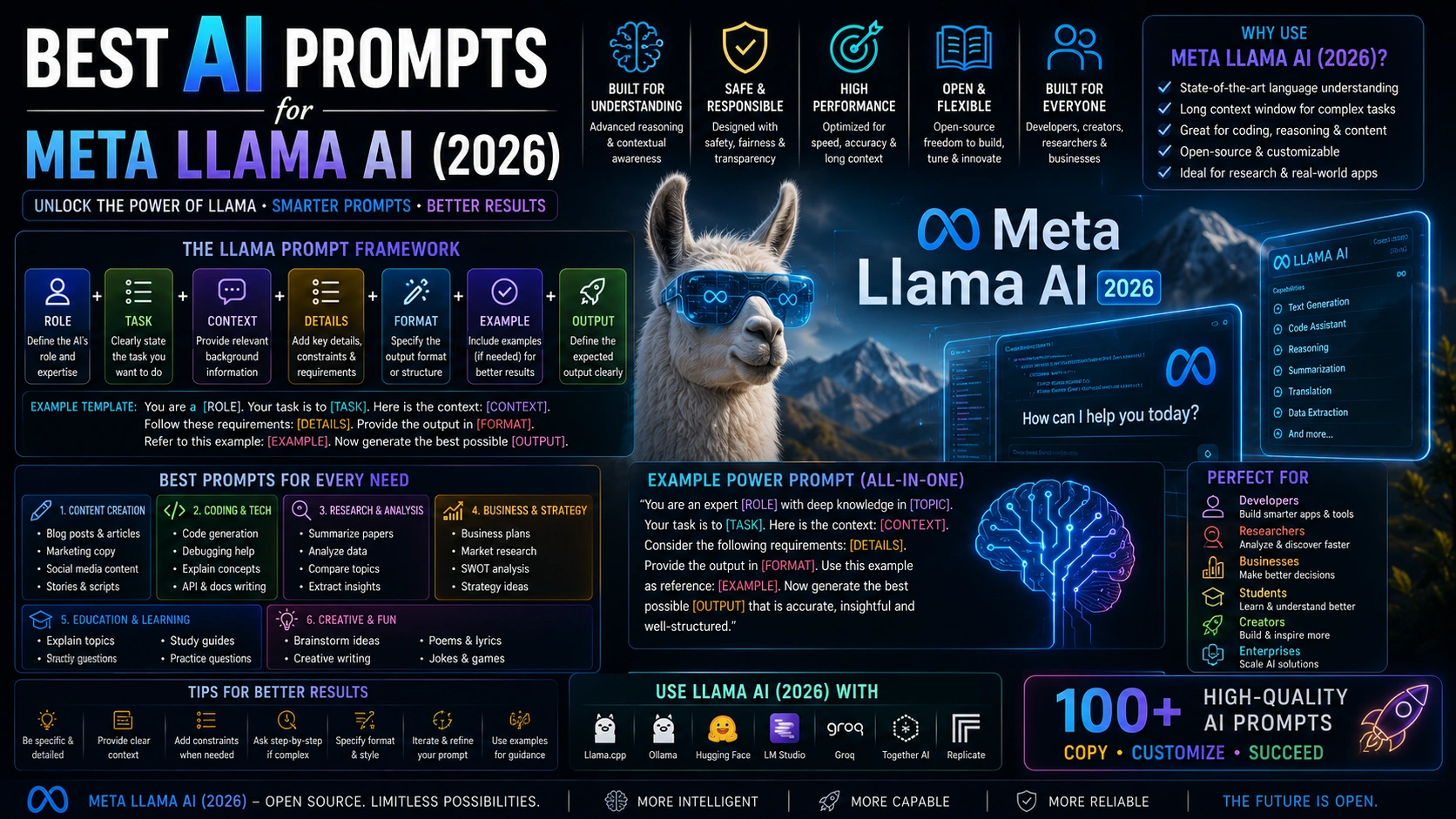
Explore practical prompts for Meta Llama models across writing, analysis, coding, research, and local AI deployment. These reusable templates work as starting points across compatible Llama instruction-tuned variants; available context length, image support, tool use, and performance depend on the exact model, runtime, quantization, and hardware. Copy a prompt, replace its placeholders, and verify important outputs.
Updated for 2026 AI Tools Tested Prompt Templates Beginner Friendly Free to Copy & Use
AI Prompts for Writing, Analysis, Coding & Research
Select a category or browse all Meta Llama prompts below
1. Llama Multimodal Image Analyst
MULTIMODAL
Analyze an image and extract useful visual information.
Analyze the attached image carefully. Identify the important objects,
text, layout, visual patterns, and relevant details. Separate what
you can directly observe from anything you are inferring, mark any
text you cannot read clearly, then give me the most useful conclusions.
Analyze the attached image carefully. Identify the important objects, text, layout, visual patterns, and relevant details. Separate what you can directly observe from anything you are inferring, mark any text you cannot read clearly, then give me the most useful conclusions.
Recommended Tech Stack: Meta Llama 3.1 / 3.2 where suitable; Ollama or LM Studio for local runs; Hugging Face Transformers / TRL for custom inference and fine-tuning; vLLM for compatible production serving. Choose the exact model and runtime based on supported features, license, hardware, and workload.
Quick Implementation Guide:
Set a clear system role and task, then provide the required context, constraints, examples, and desired output structure. Replace every bracketed placeholder in the prompt.
Run it locally or through an approved enterprise endpoint. Use Ollama or vLLM when appropriate, and record the model version, quantization, context settings, and runtime for reproducibility.
Check the result against expected examples, validate structured output or code, and adjust context length or quantization only after measuring quality, latency, and memory usage.
Real-World Use Case Example: Adapt this prompt for a private enterprise assistant, offline code/documentation workflow, or edge text-classification agent. Restrict data and tool access, keep secrets outside prompts, and require validation or human approval for consequential actions.
2. Llama Long-Context Document Analyst
2. Llama Long-Context Document Analyst
ANALYSIS
Analyze a large document and find the most important information.
Analyze this document: [paste document]. Create a structured summary,
identify the main arguments, important facts, contradictions, missing
information, and actionable conclusions. Quote or reference the
relevant sections for each point, and list anything you could not
verify from the document itself.
Analyze this document: [paste document]. Create a structured summary, identify the main arguments, important facts, contradictions, missing information, and actionable conclusions. Quote or reference the relevant sections for each point, and list anything you could not verify from the document itself.
Recommended Tech Stack: Meta Llama 3.1 / 3.2 where suitable; Ollama or LM Studio for local runs; Hugging Face Transformers / TRL for custom inference and fine-tuning; vLLM for compatible production serving. Choose the exact model and runtime based on supported features, license, hardware, and workload.
Quick Implementation Guide:
Set a clear system role and task, then provide the required context, constraints, examples, and desired output structure. Replace every bracketed placeholder in the prompt.
Run it locally or through an approved enterprise endpoint. Use Ollama or vLLM when appropriate, and record the model version, quantization, context settings, and runtime for reproducibility.
Check the result against expected examples, validate structured output or code, and adjust context length or quantization only after measuring quality, latency, and memory usage.
Real-World Use Case Example: Adapt this prompt for a private enterprise assistant, offline code/documentation workflow, or edge text-classification agent. Restrict data and tool access, keep secrets outside prompts, and require validation or human approval for consequential actions.
3. Llama Coding Assistant (Plan First)
CODING
Plan, build, review, and improve a coding task with checkpoints.
Act as a senior coding assistant. Build [FEATURE/PROJECT] using
[LANGUAGE/FRAMEWORK]. First write a short plan and ask me any
clarifying questions before coding. Then write the code in small
steps, check for errors and edge cases, and ask for confirmation
before deleting files, changing configuration, or running commands
that cannot be undone. Finish with testing steps and improvements.
Act as a senior coding assistant. Build [FEATURE/PROJECT] using [LANGUAGE/FRAMEWORK]. First write a short plan and ask me any clarifying questions before coding. Then write the code in small steps, check for errors and edge cases, and ask for confirmation before deleting files, changing configuration, or running commands that cannot be undone. Finish with testing steps and improvements.
Recommended Tech Stack: Meta Llama 3.1 / 3.2 where suitable; Ollama or LM Studio for local runs; Hugging Face Transformers / TRL for custom inference and fine-tuning; vLLM for compatible production serving. Choose the exact model and runtime based on supported features, license, hardware, and workload.
Quick Implementation Guide:
Set a clear system role and task, then provide the required context, constraints, examples, and desired output structure. Replace every bracketed placeholder in the prompt.
Run it locally or through an approved enterprise endpoint. Use Ollama or vLLM when appropriate, and record the model version, quantization, context settings, and runtime for reproducibility.
Check the result against expected examples, validate structured output or code, and adjust context length or quantization only after measuring quality, latency, and memory usage.
Real-World Use Case Example: Adapt this prompt for a private enterprise assistant, offline code/documentation workflow, or edge text-classification agent. Restrict data and tool access, keep secrets outside prompts, and require validation or human approval for consequential actions.
4. Llama Code Debugger
4. Llama Code Debugger
CODING
Find the root cause of bugs and provide a reliable fix.
Debug this code: [CODE]. Reproduce or describe the failure first,
state your hypothesis for the root cause before changing anything,
provide the smallest fix that addresses the cause, and check for
related bugs, security issues, and edge cases. Give me a test that
fails before the fix and passes after it.
Debug this code: [CODE]. Reproduce or describe the failure first, state your hypothesis for the root cause before changing anything, provide the smallest fix that addresses the cause, and check for related bugs, security issues, and edge cases. Give me a test that fails before the fix and passes after it.
Implementation Guide: 4. Llama Code Debugger
Recommended Tech Stack: Meta Llama 3.1 / 3.2 where suitable; Ollama or LM Studio for local runs; Hugging Face Transformers / TRL for custom inference and fine-tuning; vLLM for compatible production serving. Choose the exact model and runtime based on supported features, license, hardware, and workload.
Quick Implementation Guide:
Set a clear system role and task, then provide the required context, constraints, examples, and desired output structure. Replace every bracketed placeholder in the prompt.
Run it locally or through an approved enterprise endpoint. Use Ollama or vLLM when appropriate, and record the model version, quantization, context settings, and runtime for reproducibility.
Check the result against expected examples, validate structured output or code, and adjust context length or quantization only after measuring quality, latency, and memory usage.
Real-World Use Case Example: Adapt this prompt for a private enterprise assistant, offline code/documentation workflow, or edge text-classification agent. Restrict data and tool access, keep secrets outside prompts, and require validation or human approval for consequential actions.
5. Llama AI Research Assistant
5. Llama AI Research Assistant
RESEARCH
Turn a complex topic into a structured research workflow.
Research [TOPIC] systematically. Break the topic into key questions,
identify what evidence is needed, compare competing viewpoints, and
organize the findings into facts, uncertainties, and conclusions.
Do not present assumptions as verified facts, and list the sources I
should check to confirm the most important claims.
Research [TOPIC] systematically. Break the topic into key questions, identify what evidence is needed, compare competing viewpoints, and organize the findings into facts, uncertainties, and conclusions. Do not present assumptions as verified facts, and list the sources I should check to confirm the most important claims.
Implementation Guide: 5. Llama AI Research Assistant
Recommended Tech Stack: Meta Llama 3.1 / 3.2 where suitable; Ollama or LM Studio for local runs; Hugging Face Transformers / TRL for custom inference and fine-tuning; vLLM for compatible production serving. Choose the exact model and runtime based on supported features, license, hardware, and workload.
Quick Implementation Guide:
Set a clear system role and task, then provide the required context, constraints, examples, and desired output structure. Replace every bracketed placeholder in the prompt.
Run it locally or through an approved enterprise endpoint. Use Ollama or vLLM when appropriate, and record the model version, quantization, context settings, and runtime for reproducibility.
Check the result against expected examples, validate structured output or code, and adjust context length or quantization only after measuring quality, latency, and memory usage.
Real-World Use Case Example: Adapt this prompt for a private enterprise assistant, offline code/documentation workflow, or edge text-classification agent. Restrict data and tool access, keep secrets outside prompts, and require validation or human approval for consequential actions.
6. Llama Structured Data Extractor
6. Llama Structured Data Extractor
DATA
Extract useful structured information from messy text.
Extract the following information from this text: [TEXT].
Return the results as valid JSON only, with no extra commentary,
using these fields: [FIELD 1, FIELD 2, FIELD 3]. Use null when
information is missing, do not invent values, and add a
"confidence" field (high, medium, low) for each extracted value.
Extract the following information from this text: [TEXT]. Return the results as valid JSON only, with no extra commentary, using these fields: [FIELD 1, FIELD 2, FIELD 3]. Use null when information is missing, do not invent values, and add a "confidence" field (high, medium, low) for each extracted value.
Implementation Guide: 6. Llama Structured Data Extractor
Recommended Tech Stack: Meta Llama 3.1 / 3.2 where suitable; Ollama or LM Studio for local runs; Hugging Face Transformers / TRL for custom inference and fine-tuning; vLLM for compatible production serving. Choose the exact model and runtime based on supported features, license, hardware, and workload.
Quick Implementation Guide:
Set a clear system role and task, then provide the required context, constraints, examples, and desired output structure. Replace every bracketed placeholder in the prompt.
Run it locally or through an approved enterprise endpoint. Use Ollama or vLLM when appropriate, and record the model version, quantization, context settings, and runtime for reproducibility.
Check the result against expected examples, validate structured output or code, and adjust context length or quantization only after measuring quality, latency, and memory usage.
Real-World Use Case Example: Adapt this prompt for a private enterprise assistant, offline code/documentation workflow, or edge text-classification agent. Restrict data and tool access, keep secrets outside prompts, and require validation or human approval for consequential actions.
7. Llama Tool-Calling Assistant
7. Llama Tool-Calling Assistant
AGENTS
Plan which tools or actions are needed to complete a task.
Act as a tool-using AI assistant. My goal is [GOAL]. Determine
which available tools are necessary, what information each tool
needs, the correct order of actions, and what should be verified
before reporting the final result. If my request is ambiguous, ask
me a clarifying question first, and confirm with me before any
action that sends, spends, deletes, or changes something.
Act as a tool-using AI assistant. My goal is [GOAL]. Determine which available tools are necessary, what information each tool needs, the correct order of actions, and what should be verified before reporting the final result. If my request is ambiguous, ask me a clarifying question first, and confirm with me before any action that sends, spends, deletes, or changes something.
Recommended Tech Stack: Meta Llama 3.1 / 3.2 where suitable; Ollama or LM Studio for local runs; Hugging Face Transformers / TRL for custom inference and fine-tuning; vLLM for compatible production serving. Choose the exact model and runtime based on supported features, license, hardware, and workload.
Quick Implementation Guide:
Set a clear system role and task, then provide the required context, constraints, examples, and desired output structure. Replace every bracketed placeholder in the prompt.
Run it locally or through an approved enterprise endpoint. Use Ollama or vLLM when appropriate, and record the model version, quantization, context settings, and runtime for reproducibility.
Check the result against expected examples, validate structured output or code, and adjust context length or quantization only after measuring quality, latency, and memory usage.
Real-World Use Case Example: Adapt this prompt for a private enterprise assistant, offline code/documentation workflow, or edge text-classification agent. Restrict data and tool access, keep secrets outside prompts, and require validation or human approval for consequential actions.
8. Llama Reasoning & Decision Assistant
8. Llama Reasoning & Decision Assistant
REASONING
Break difficult decisions into evidence, trade-offs, and actions.
Analyze this decision: [DECISION]. Identify the key criteria,
constraints, trade-offs, risks, and unknowns. Compare the available
options and provide a recommendation based only on the information
provided. Clearly state what additional information could change it.
Analyze this decision: [DECISION]. Identify the key criteria, constraints, trade-offs, risks, and unknowns. Compare the available options and provide a recommendation based only on the information provided. Clearly state what additional information could change it.
Recommended Tech Stack: Meta Llama 3.1 / 3.2 where suitable; Ollama or LM Studio for local runs; Hugging Face Transformers / TRL for custom inference and fine-tuning; vLLM for compatible production serving. Choose the exact model and runtime based on supported features, license, hardware, and workload.
Quick Implementation Guide:
Set a clear system role and task, then provide the required context, constraints, examples, and desired output structure. Replace every bracketed placeholder in the prompt.
Run it locally or through an approved enterprise endpoint. Use Ollama or vLLM when appropriate, and record the model version, quantization, context settings, and runtime for reproducibility.
Check the result against expected examples, validate structured output or code, and adjust context length or quantization only after measuring quality, latency, and memory usage.
Real-World Use Case Example: Adapt this prompt for a private enterprise assistant, offline code/documentation workflow, or edge text-classification agent. Restrict data and tool access, keep secrets outside prompts, and require validation or human approval for consequential actions.
9. Llama Multilingual Assistant
9. Llama Multilingual Assistant
MULTILINGUAL
Translate and adapt content while preserving its intended meaning.
Translate this content into [LANGUAGE, e.g. Hindi, Hinglish, Spanish]
for readers in [REGION]. Preserve the original meaning, tone,
formatting, and important terminology. Adapt idioms and cultural
references only when needed, keep common English words that people
actually use, and flag any phrase that could have multiple
interpretations.
Translate this content into [LANGUAGE, e.g. Hindi, Hinglish, Spanish] for readers in [REGION]. Preserve the original meaning, tone, formatting, and important terminology. Adapt idioms and cultural references only when needed, keep common English words that people actually use, and flag any phrase that could have multiple interpretations.
Recommended Tech Stack: Meta Llama 3.1 / 3.2 where suitable; Ollama or LM Studio for local runs; Hugging Face Transformers / TRL for custom inference and fine-tuning; vLLM for compatible production serving. Choose the exact model and runtime based on supported features, license, hardware, and workload.
Quick Implementation Guide:
Set a clear system role and task, then provide the required context, constraints, examples, and desired output structure. Replace every bracketed placeholder in the prompt.
Run it locally or through an approved enterprise endpoint. Use Ollama or vLLM when appropriate, and record the model version, quantization, context settings, and runtime for reproducibility.
Check the result against expected examples, validate structured output or code, and adjust context length or quantization only after measuring quality, latency, and memory usage.
Real-World Use Case Example: Adapt this prompt for a private enterprise assistant, offline code/documentation workflow, or edge text-classification agent. Restrict data and tool access, keep secrets outside prompts, and require validation or human approval for consequential actions.
10. Llama Local Private Agent Builder
10. Llama Local Private Agent Builder
AGENTS
Design an always-on agent that runs on your own computer so your data stays private.
Design a private AI agent that runs locally on one consumer GPU
for [TASK, e.g. organizing documents, drafting replies, monitoring
a folder]. Define the objective, the files and data it may access,
the tools it may call, its memory, the checks it must pass before
acting, what it must never do without my approval, a log of every
action, and how I stop it instantly. Include the hardware and
quantization settings to try first and how to test quality before
trusting it with real data.
Design a private AI agent that runs locally on one consumer GPU for [TASK, e.g. organizing documents, drafting replies, monitoring a folder]. Define the objective, the files and data it may access, the tools it may call, its memory, the checks it must pass before acting, what it must never do without my approval, a log of every action, and how I stop it instantly. Include the hardware and quantization settings to try first and how to test quality before trusting it with real data.
Implementation Guide: 10. Llama Local Private Agent Builder
Recommended Tech Stack: Meta Llama 3.1 / 3.2 where suitable; Ollama or LM Studio for local runs; Hugging Face Transformers / TRL for custom inference and fine-tuning; vLLM for compatible production serving. Choose the exact model and runtime based on supported features, license, hardware, and workload.
Quick Implementation Guide:
Set a clear system role and task, then provide the required context, constraints, examples, and desired output structure. Replace every bracketed placeholder in the prompt.
Run it locally or through an approved enterprise endpoint. Use Ollama or vLLM when appropriate, and record the model version, quantization, context settings, and runtime for reproducibility.
Check the result against expected examples, validate structured output or code, and adjust context length or quantization only after measuring quality, latency, and memory usage.
Real-World Use Case Example: Adapt this prompt for a private enterprise assistant, offline code/documentation workflow, or edge text-classification agent. Restrict data and tool access, keep secrets outside prompts, and require validation or human approval for consequential actions.
11. Open-Weights Model Selection & Self-Hosting Plan
ANALYSIS
Choose an open model for your project and plan how to run it yourself.
I want to self-host an open-weights model for [USE CASE] with
[HARDWARE/BUDGET]. Compare the current options (for example Muse
Glimmer 30B, Llama 4 Scout, and other open models) on license terms,
size, context length, image support, quality for my task, hardware
needed, and cost versus a hosted API. Recommend one, give a
step-by-step setup plan, a 20-prompt test to compare it with a
hosted model, and the risks to check, such as license limits and
data privacy. Tell me which facts I should verify on the official
model pages first.
I want to self-host an open-weights model for [USE CASE] with [HARDWARE/BUDGET]. Compare the current options (for example Llama model sized for your hardware, Llama 4 Scout, and other open models) on license terms, size, context length, image support, quality for my task, hardware needed, and cost versus a hosted API. Recommend one, give a step-by-step setup plan, a 20-prompt test to compare it with a hosted model, and the risks to check, such as license limits and data privacy. Tell me which facts I should verify on the official model pages first.
Implementation Guide: 11. Open-Weights Model Selection & Self-Hosting Plan
Recommended Tech Stack: Meta Llama 3.1 / 3.2 where suitable; Ollama or LM Studio for local runs; Hugging Face Transformers / TRL for custom inference and fine-tuning; vLLM for compatible production serving. Choose the exact model and runtime based on supported features, license, hardware, and workload.
Quick Implementation Guide:
Set a clear system role and task, then provide the required context, constraints, examples, and desired output structure. Replace every bracketed placeholder in the prompt.
Run it locally or through an approved enterprise endpoint. Use Ollama or vLLM when appropriate, and record the model version, quantization, context settings, and runtime for reproducibility.
Check the result against expected examples, validate structured output or code, and adjust context length or quantization only after measuring quality, latency, and memory usage.
Real-World Use Case Example: Adapt this prompt for a private enterprise assistant, offline code/documentation workflow, or edge text-classification agent. Restrict data and tool access, keep secrets outside prompts, and require validation or human approval for consequential actions.
12. Competitor Feature Comparison Matrix
ANALYSIS
Build a detailed comparison table of competitors.
Compare [our product] with [competitor A] and [competitor B] on these dimensions: pricing, key features, target audience, support quality, and innovation. Output a markdown table and a paragraph summarizing our unique advantage.
Compare [our product] with [competitor A] and [competitor B] on these dimensions: pricing, key features, target audience, support quality, and innovation. Output a markdown table and a paragraph summarizing our unique advantage.
Recommended Tech Stack: Meta Llama 3.1 / 3.2 where suitable; Ollama or LM Studio for local runs; Hugging Face Transformers / TRL for custom inference and fine-tuning; vLLM for compatible production serving. Choose the exact model and runtime based on supported features, license, hardware, and workload.
Quick Implementation Guide:
Set a clear system role and task, then provide the required context, constraints, examples, and desired output structure. Replace every bracketed placeholder in the prompt.
Run it locally or through an approved enterprise endpoint. Use Ollama or vLLM when appropriate, and record the model version, quantization, context settings, and runtime for reproducibility.
Check the result against expected examples, validate structured output or code, and adjust context length or quantization only after measuring quality, latency, and memory usage.
Real-World Use Case Example: Adapt this prompt for a private enterprise assistant, offline code/documentation workflow, or edge text-classification agent. Restrict data and tool access, keep secrets outside prompts, and require validation or human approval for consequential actions.
13. Policy Impact Forecasting
ANALYSIS
Simulate the effects of a new policy on different stakeholders.
Analyze the likely impacts of this proposed policy: [policy text]. Identify primary, secondary, and tertiary effects on [list stakeholders]. Provide a scenario matrix: short-term vs long-term, intended vs unintended consequences.
Analyze the likely impacts of this proposed policy: [policy text]. Identify primary, secondary, and tertiary effects on [list stakeholders]. Provide a scenario matrix: short-term vs long-term, intended vs unintended consequences.
Recommended Tech Stack: Meta Llama 3.1 / 3.2 where suitable; Ollama or LM Studio for local runs; Hugging Face Transformers / TRL for custom inference and fine-tuning; vLLM for compatible production serving. Choose the exact model and runtime based on supported features, license, hardware, and workload.
Quick Implementation Guide:
Set a clear system role and task, then provide the required context, constraints, examples, and desired output structure. Replace every bracketed placeholder in the prompt.
Run it locally or through an approved enterprise endpoint. Use Ollama or vLLM when appropriate, and record the model version, quantization, context settings, and runtime for reproducibility.
Check the result against expected examples, validate structured output or code, and adjust context length or quantization only after measuring quality, latency, and memory usage.
Real-World Use Case Example: Adapt this prompt for a private enterprise assistant, offline code/documentation workflow, or edge text-classification agent. Restrict data and tool access, keep secrets outside prompts, and require validation or human approval for consequential actions.
14. Root Cause Investigation (Ishikawa Diagram)
ANALYSIS
Use a structured fishbone diagram approach to find root causes.
The problem is: [describe problem]. Perform a root cause analysis using the Ishikawa (fishbone) categories: People, Process, Equipment, Materials, Environment, Management. List possible causes under each and identify the top 3 most probable root causes.
The problem is: [describe problem]. Perform a root cause analysis using the Ishikawa (fishbone) categories: People, Process, Equipment, Materials, Environment, Management. List possible causes under each and identify the top 3 most probable root causes.
Implementation Guide: 14. Root Cause Investigation (Ishikawa Diagram)
Recommended Tech Stack: Meta Llama 3.1 / 3.2 where suitable; Ollama or LM Studio for local runs; Hugging Face Transformers / TRL for custom inference and fine-tuning; vLLM for compatible production serving. Choose the exact model and runtime based on supported features, license, hardware, and workload.
Quick Implementation Guide:
Set a clear system role and task, then provide the required context, constraints, examples, and desired output structure. Replace every bracketed placeholder in the prompt.
Run it locally or through an approved enterprise endpoint. Use Ollama or vLLM when appropriate, and record the model version, quantization, context settings, and runtime for reproducibility.
Check the result against expected examples, validate structured output or code, and adjust context length or quantization only after measuring quality, latency, and memory usage.
Real-World Use Case Example: Adapt this prompt for a private enterprise assistant, offline code/documentation workflow, or edge text-classification agent. Restrict data and tool access, keep secrets outside prompts, and require validation or human approval for consequential actions.
15. Sentiment Analysis & Trend Extraction from Text
ANALYSIS
Analyze open-ended survey responses for sentiment and key themes.
Analyze these customer feedback comments: [paste comments]. First, classify each as positive, negative, or neutral. Then, extract the top 5 recurring themes. Provide a summary of overall sentiment and one actionable recommendation.
Analyze these customer feedback comments: [paste comments]. First, classify each as positive, negative, or neutral. Then, extract the top 5 recurring themes. Provide a summary of overall sentiment and one actionable recommendation.
Implementation Guide: 15. Sentiment Analysis & Trend Extraction from Text
Recommended Tech Stack: Meta Llama 3.1 / 3.2 where suitable; Ollama or LM Studio for local runs; Hugging Face Transformers / TRL for custom inference and fine-tuning; vLLM for compatible production serving. Choose the exact model and runtime based on supported features, license, hardware, and workload.
Quick Implementation Guide:
Set a clear system role and task, then provide the required context, constraints, examples, and desired output structure. Replace every bracketed placeholder in the prompt.
Run it locally or through an approved enterprise endpoint. Use Ollama or vLLM when appropriate, and record the model version, quantization, context settings, and runtime for reproducibility.
Check the result against expected examples, validate structured output or code, and adjust context length or quantization only after measuring quality, latency, and memory usage.
Real-World Use Case Example: Adapt this prompt for a private enterprise assistant, offline code/documentation workflow, or edge text-classification agent. Restrict data and tool access, keep secrets outside prompts, and require validation or human approval for consequential actions.
16. Multi-Document Contradiction Finder
ANALYSIS
Load multiple long documents and find inconsistencies.
I'm uploading three reports: [paste/describe docs]. Compare them and highlight any factual contradictions, conflicting statistics, or inconsistent claims. Create a table of the contradictions with exact references to each document.
I'm uploading three reports: [paste/describe docs]. Compare them and highlight any factual contradictions, conflicting statistics, or inconsistent claims. Create a table of the contradictions with exact references to each document.
Implementation Guide: 16. Multi-Document Contradiction Finder
Recommended Tech Stack: Meta Llama 3.1 / 3.2 where suitable; Ollama or LM Studio for local runs; Hugging Face Transformers / TRL for custom inference and fine-tuning; vLLM for compatible production serving. Choose the exact model and runtime based on supported features, license, hardware, and workload.
Quick Implementation Guide:
Set a clear system role and task, then provide the required context, constraints, examples, and desired output structure. Replace every bracketed placeholder in the prompt.
Run it locally or through an approved enterprise endpoint. Use Ollama or vLLM when appropriate, and record the model version, quantization, context settings, and runtime for reproducibility.
Check the result against expected examples, validate structured output or code, and adjust context length or quantization only after measuring quality, latency, and memory usage.
Real-World Use Case Example: Adapt this prompt for a private enterprise assistant, offline code/documentation workflow, or edge text-classification agent. Restrict data and tool access, keep secrets outside prompts, and require validation or human approval for consequential actions.
17. Full API Endpoint with Validation
CODING
Generate a production-ready API route with input validation and error handling.
Create a [Node.js/FastAPI] endpoint for [resource, e.g., user registration]. Include request body validation, password hashing, error responses in a standard format, and a success response. Use environment variables for secrets. Write clean, commented code.
Create a [Node.js/FastAPI] endpoint for [resource, e.g., user registration]. Include request body validation, password hashing, error responses in a standard format, and a success response. Use environment variables for secrets. Write clean, commented code.
Implementation Guide: 17. Full API Endpoint with Validation
Recommended Tech Stack: Meta Llama 3.1 / 3.2 where suitable; Ollama or LM Studio for local runs; Hugging Face Transformers / TRL for custom inference and fine-tuning; vLLM for compatible production serving. Choose the exact model and runtime based on supported features, license, hardware, and workload.
Quick Implementation Guide:
Set a clear system role and task, then provide the required context, constraints, examples, and desired output structure. Replace every bracketed placeholder in the prompt.
Run it locally or through an approved enterprise endpoint. Use Ollama or vLLM when appropriate, and record the model version, quantization, context settings, and runtime for reproducibility.
Check the result against expected examples, validate structured output or code, and adjust context length or quantization only after measuring quality, latency, and memory usage.
Real-World Use Case Example: Adapt this prompt for a private enterprise assistant, offline code/documentation workflow, or edge text-classification agent. Restrict data and tool access, keep secrets outside prompts, and require validation or human approval for consequential actions.
18. Database Schema Design from Requirements
CODING
Translate a product spec into a normalized database schema.
Given these requirements: [describe app requirements]. Design a PostgreSQL schema. Provide CREATE TABLE statements with appropriate data types, primary keys, foreign keys, and indexes. Justify your normalization choices and suggest any denormalization for performance if needed.
Given these requirements: [describe app requirements]. Design a PostgreSQL schema. Provide CREATE TABLE statements with appropriate data types, primary keys, foreign keys, and indexes. Justify your normalization choices and suggest any denormalization for performance if needed.
Implementation Guide: 18. Database Schema Design from Requirements
Recommended Tech Stack: Meta Llama 3.1 / 3.2 where suitable; Ollama or LM Studio for local runs; Hugging Face Transformers / TRL for custom inference and fine-tuning; vLLM for compatible production serving. Choose the exact model and runtime based on supported features, license, hardware, and workload.
Quick Implementation Guide:
Set a clear system role and task, then provide the required context, constraints, examples, and desired output structure. Replace every bracketed placeholder in the prompt.
Run it locally or through an approved enterprise endpoint. Use Ollama or vLLM when appropriate, and record the model version, quantization, context settings, and runtime for reproducibility.
Check the result against expected examples, validate structured output or code, and adjust context length or quantization only after measuring quality, latency, and memory usage.
Real-World Use Case Example: Adapt this prompt for a private enterprise assistant, offline code/documentation workflow, or edge text-classification agent. Restrict data and tool access, keep secrets outside prompts, and require validation or human approval for consequential actions.
19. Algorithm Complexity Analyzer
CODING
Analyze a code snippet's time and space complexity with improvement suggestions.
Here is a function: [paste code]. Analyze its time and space complexity in Big-O notation. Walk through how you arrived at the result. Then, propose an optimized version if possible, and compare the complexity of the two approaches.
Here is a function: [paste code]. Analyze its time and space complexity in Big-O notation. Walk through how you arrived at the result. Then, propose an optimized version if possible, and compare the complexity of the two approaches.
Recommended Tech Stack: Meta Llama 3.1 / 3.2 where suitable; Ollama or LM Studio for local runs; Hugging Face Transformers / TRL for custom inference and fine-tuning; vLLM for compatible production serving. Choose the exact model and runtime based on supported features, license, hardware, and workload.
Quick Implementation Guide:
Set a clear system role and task, then provide the required context, constraints, examples, and desired output structure. Replace every bracketed placeholder in the prompt.
Run it locally or through an approved enterprise endpoint. Use Ollama or vLLM when appropriate, and record the model version, quantization, context settings, and runtime for reproducibility.
Check the result against expected examples, validate structured output or code, and adjust context length or quantization only after measuring quality, latency, and memory usage.
Real-World Use Case Example: Adapt this prompt for a private enterprise assistant, offline code/documentation workflow, or edge text-classification agent. Restrict data and tool access, keep secrets outside prompts, and require validation or human approval for consequential actions.
20. Security Vulnerability Patch
CODING
Identify and fix security issues in code.
Review this code for security vulnerabilities: [paste code]. Focus on OWASP Top 10 risks. For each vulnerability found, explain the risk, provide a patched code snippet, and recommend security best practices to avoid similar issues.
Review this code for security vulnerabilities: [paste code]. Focus on OWASP Top 10 risks. For each vulnerability found, explain the risk, provide a patched code snippet, and recommend security best practices to avoid similar issues.
Recommended Tech Stack: Meta Llama 3.1 / 3.2 where suitable; Ollama or LM Studio for local runs; Hugging Face Transformers / TRL for custom inference and fine-tuning; vLLM for compatible production serving. Choose the exact model and runtime based on supported features, license, hardware, and workload.
Quick Implementation Guide:
Set a clear system role and task, then provide the required context, constraints, examples, and desired output structure. Replace every bracketed placeholder in the prompt.
Run it locally or through an approved enterprise endpoint. Use Ollama or vLLM when appropriate, and record the model version, quantization, context settings, and runtime for reproducibility.
Check the result against expected examples, validate structured output or code, and adjust context length or quantization only after measuring quality, latency, and memory usage.
Real-World Use Case Example: Adapt this prompt for a private enterprise assistant, offline code/documentation workflow, or edge text-classification agent. Restrict data and tool access, keep secrets outside prompts, and require validation or human approval for consequential actions.
21. Dockerfile and CI/CD Pipeline Generator
CODING
Generate a complete containerization and deployment setup.
For this project description: [describe project tech stack], generate a Dockerfile and a GitHub Actions CI/CD pipeline that builds, tests, and pushes the image to a registry. Include comments explaining each step.
For this project description: [describe project tech stack], generate a Dockerfile and a GitHub Actions CI/CD pipeline that builds, tests, and pushes the image to a registry. Include comments explaining each step.
Implementation Guide: 21. Dockerfile and CI/CD Pipeline Generator
Recommended Tech Stack: Meta Llama 3.1 / 3.2 where suitable; Ollama or LM Studio for local runs; Hugging Face Transformers / TRL for custom inference and fine-tuning; vLLM for compatible production serving. Choose the exact model and runtime based on supported features, license, hardware, and workload.
Quick Implementation Guide:
Set a clear system role and task, then provide the required context, constraints, examples, and desired output structure. Replace every bracketed placeholder in the prompt.
Run it locally or through an approved enterprise endpoint. Use Ollama or vLLM when appropriate, and record the model version, quantization, context settings, and runtime for reproducibility.
Check the result against expected examples, validate structured output or code, and adjust context length or quantization only after measuring quality, latency, and memory usage.
Real-World Use Case Example: Adapt this prompt for a private enterprise assistant, offline code/documentation workflow, or edge text-classification agent. Restrict data and tool access, keep secrets outside prompts, and require validation or human approval for consequential actions.
22. Unit Test Suite for Edge Cases
CODING
Generate thorough unit tests covering typical and edge cases.
Write unit tests using [framework, e.g., Jest] for this function: [paste function]. Cover: normal inputs, boundary values, null/undefined, empty arrays, and invalid types. Each test should have a clear description of what it verifies.
Write unit tests using [framework, e.g., Jest] for this function: [paste function]. Cover: normal inputs, boundary values, null/undefined, empty arrays, and invalid types. Each test should have a clear description of what it verifies.
Implementation Guide: 22. Unit Test Suite for Edge Cases
Recommended Tech Stack: Meta Llama 3.1 / 3.2 where suitable; Ollama or LM Studio for local runs; Hugging Face Transformers / TRL for custom inference and fine-tuning; vLLM for compatible production serving. Choose the exact model and runtime based on supported features, license, hardware, and workload.
Quick Implementation Guide:
Set a clear system role and task, then provide the required context, constraints, examples, and desired output structure. Replace every bracketed placeholder in the prompt.
Run it locally or through an approved enterprise endpoint. Use Ollama or vLLM when appropriate, and record the model version, quantization, context settings, and runtime for reproducibility.
Check the result against expected examples, validate structured output or code, and adjust context length or quantization only after measuring quality, latency, and memory usage.
Real-World Use Case Example: Adapt this prompt for a private enterprise assistant, offline code/documentation workflow, or edge text-classification agent. Restrict data and tool access, keep secrets outside prompts, and require validation or human approval for consequential actions.
23. Code Explanation for Junior Developers
CODING
Explain complex code in simple, educational terms.
Explain this code to a junior developer who is learning [language]: [paste code]. Break it down line by line, explain the purpose of each block, and highlight any tricky concepts. Use analogies where helpful.
Explain this code to a junior developer who is learning [language]: [paste code]. Break it down line by line, explain the purpose of each block, and highlight any tricky concepts. Use analogies where helpful.
Implementation Guide: 23. Code Explanation for Junior Developers
Recommended Tech Stack: Meta Llama 3.1 / 3.2 where suitable; Ollama or LM Studio for local runs; Hugging Face Transformers / TRL for custom inference and fine-tuning; vLLM for compatible production serving. Choose the exact model and runtime based on supported features, license, hardware, and workload.
Quick Implementation Guide:
Set a clear system role and task, then provide the required context, constraints, examples, and desired output structure. Replace every bracketed placeholder in the prompt.
Run it locally or through an approved enterprise endpoint. Use Ollama or vLLM when appropriate, and record the model version, quantization, context settings, and runtime for reproducibility.
Check the result against expected examples, validate structured output or code, and adjust context length or quantization only after measuring quality, latency, and memory usage.
Real-World Use Case Example: Adapt this prompt for a private enterprise assistant, offline code/documentation workflow, or edge text-classification agent. Restrict data and tool access, keep secrets outside prompts, and require validation or human approval for consequential actions.
24. Research Paper Abstract Generator
RESEARCH
Draft a structured abstract from a full paper or notes.
Using the provided paper text: [paste paper sections], write a structured abstract (Background, Methods, Results, Conclusions) in under 300 words. Ensure the abstract accurately reflects the paper's contributions and does not overclaim.
Using the provided paper text: [paste paper sections], write a structured abstract (Background, Methods, Results, Conclusions) in under 300 words. Ensure the abstract accurately reflects the paper's contributions and does not overclaim.
Implementation Guide: 24. Research Paper Abstract Generator
Recommended Tech Stack: Meta Llama 3.1 / 3.2 where suitable; Ollama or LM Studio for local runs; Hugging Face Transformers / TRL for custom inference and fine-tuning; vLLM for compatible production serving. Choose the exact model and runtime based on supported features, license, hardware, and workload.
Quick Implementation Guide:
Set a clear system role and task, then provide the required context, constraints, examples, and desired output structure. Replace every bracketed placeholder in the prompt.
Run it locally or through an approved enterprise endpoint. Use Ollama or vLLM when appropriate, and record the model version, quantization, context settings, and runtime for reproducibility.
Check the result against expected examples, validate structured output or code, and adjust context length or quantization only after measuring quality, latency, and memory usage.
Real-World Use Case Example: Adapt this prompt for a private enterprise assistant, offline code/documentation workflow, or edge text-classification agent. Restrict data and tool access, keep secrets outside prompts, and require validation or human approval for consequential actions.
25. Literature Review Gap Finder
RESEARCH
Identify research gaps from a set of paper summaries.
Here are summaries of 10 papers on [topic]: [paste summaries]. Synthesize their main findings, map out the consensus and disagreements, and specifically identify three under-researched areas that would make viable future research questions.
Here are summaries of 10 papers on [topic]: [paste summaries]. Synthesize their main findings, map out the consensus and disagreements, and specifically identify three under-researched areas that would make viable future research questions.
Implementation Guide: 25. Literature Review Gap Finder
Recommended Tech Stack: Meta Llama 3.1 / 3.2 where suitable; Ollama or LM Studio for local runs; Hugging Face Transformers / TRL for custom inference and fine-tuning; vLLM for compatible production serving. Choose the exact model and runtime based on supported features, license, hardware, and workload.
Quick Implementation Guide:
Set a clear system role and task, then provide the required context, constraints, examples, and desired output structure. Replace every bracketed placeholder in the prompt.
Run it locally or through an approved enterprise endpoint. Use Ollama or vLLM when appropriate, and record the model version, quantization, context settings, and runtime for reproducibility.
Check the result against expected examples, validate structured output or code, and adjust context length or quantization only after measuring quality, latency, and memory usage.
Real-World Use Case Example: Adapt this prompt for a private enterprise assistant, offline code/documentation workflow, or edge text-classification agent. Restrict data and tool access, keep secrets outside prompts, and require validation or human approval for consequential actions.
26. Survey Question Design Assistant
RESEARCH
Create unbiased, effective survey questions.
I need to measure [construct, e.g., customer satisfaction] in a survey. Draft 10 questions using a mix of Likert scale, multiple choice, and open-ended formats. Review the questions for leading language, double-barreling, and social desirability bias, and suggest improvements.
I need to measure [construct, e.g., customer satisfaction] in a survey. Draft 10 questions using a mix of Likert scale, multiple choice, and open-ended formats. Review the questions for leading language, double-barreling, and social desirability bias, and suggest improvements.
Recommended Tech Stack: Meta Llama 3.1 / 3.2 where suitable; Ollama or LM Studio for local runs; Hugging Face Transformers / TRL for custom inference and fine-tuning; vLLM for compatible production serving. Choose the exact model and runtime based on supported features, license, hardware, and workload.
Quick Implementation Guide:
Set a clear system role and task, then provide the required context, constraints, examples, and desired output structure. Replace every bracketed placeholder in the prompt.
Run it locally or through an approved enterprise endpoint. Use Ollama or vLLM when appropriate, and record the model version, quantization, context settings, and runtime for reproducibility.
Check the result against expected examples, validate structured output or code, and adjust context length or quantization only after measuring quality, latency, and memory usage.
Real-World Use Case Example: Adapt this prompt for a private enterprise assistant, offline code/documentation workflow, or edge text-classification agent. Restrict data and tool access, keep secrets outside prompts, and require validation or human approval for consequential actions.
27. Qualitative Data Coding Assistant
RESEARCH
Perform thematic coding on interview transcripts.
Code this interview transcript using thematic analysis: [paste transcript]. First, generate initial open codes. Then, group them into broader themes. Provide a summary of each theme with illustrative quotes from the transcript.
Code this interview transcript using thematic analysis: [paste transcript]. First, generate initial open codes. Then, group them into broader themes. Provide a summary of each theme with illustrative quotes from the transcript.
Implementation Guide: 27. Qualitative Data Coding Assistant
Recommended Tech Stack: Meta Llama 3.1 / 3.2 where suitable; Ollama or LM Studio for local runs; Hugging Face Transformers / TRL for custom inference and fine-tuning; vLLM for compatible production serving. Choose the exact model and runtime based on supported features, license, hardware, and workload.
Quick Implementation Guide:
Set a clear system role and task, then provide the required context, constraints, examples, and desired output structure. Replace every bracketed placeholder in the prompt.
Run it locally or through an approved enterprise endpoint. Use Ollama or vLLM when appropriate, and record the model version, quantization, context settings, and runtime for reproducibility.
Check the result against expected examples, validate structured output or code, and adjust context length or quantization only after measuring quality, latency, and memory usage.
Real-World Use Case Example: Adapt this prompt for a private enterprise assistant, offline code/documentation workflow, or edge text-classification agent. Restrict data and tool access, keep secrets outside prompts, and require validation or human approval for consequential actions.
28. Patent Prior Art Search Query Builder
RESEARCH
Build a search strategy for patent databases.
I have an invention described as: [invention description]. Generate a Boolean search query for patent prior art, combining IPC/CPC classifications, keywords, and synonyms. Provide the logic behind the query construction.
I have an invention described as: [invention description]. Generate a Boolean search query for patent prior art, combining IPC/CPC classifications, keywords, and synonyms. Provide the logic behind the query construction.
Implementation Guide: 28. Patent Prior Art Search Query Builder
Recommended Tech Stack: Meta Llama 3.1 / 3.2 where suitable; Ollama or LM Studio for local runs; Hugging Face Transformers / TRL for custom inference and fine-tuning; vLLM for compatible production serving. Choose the exact model and runtime based on supported features, license, hardware, and workload.
Quick Implementation Guide:
Set a clear system role and task, then provide the required context, constraints, examples, and desired output structure. Replace every bracketed placeholder in the prompt.
Run it locally or through an approved enterprise endpoint. Use Ollama or vLLM when appropriate, and record the model version, quantization, context settings, and runtime for reproducibility.
Check the result against expected examples, validate structured output or code, and adjust context length or quantization only after measuring quality, latency, and memory usage.
Real-World Use Case Example: Adapt this prompt for a private enterprise assistant, offline code/documentation workflow, or edge text-classification agent. Restrict data and tool access, keep secrets outside prompts, and require validation or human approval for consequential actions.
29. Long Document Summarization with Hierarchical Outlines
RESEARCH
Summarize a 100-page report into a nested, structured digest.
Summarize this long document: [paste/upload]. Create a hierarchical outline with main chapters/sections, sub-points, and a one-sentence summary for each sub-point. End with an overall executive summary.
Summarize this long document: [paste/upload]. Create a hierarchical outline with main chapters/sections, sub-points, and a one-sentence summary for each sub-point. End with an overall executive summary.
Implementation Guide: 29. Long Document Summarization with Hierarchical Outlines
Recommended Tech Stack: Meta Llama 3.1 / 3.2 where suitable; Ollama or LM Studio for local runs; Hugging Face Transformers / TRL for custom inference and fine-tuning; vLLM for compatible production serving. Choose the exact model and runtime based on supported features, license, hardware, and workload.
Quick Implementation Guide:
Set a clear system role and task, then provide the required context, constraints, examples, and desired output structure. Replace every bracketed placeholder in the prompt.
Run it locally or through an approved enterprise endpoint. Use Ollama or vLLM when appropriate, and record the model version, quantization, context settings, and runtime for reproducibility.
Check the result against expected examples, validate structured output or code, and adjust context length or quantization only after measuring quality, latency, and memory usage.
Real-World Use Case Example: Adapt this prompt for a private enterprise assistant, offline code/documentation workflow, or edge text-classification agent. Restrict data and tool access, keep secrets outside prompts, and require validation or human approval for consequential actions.
Optimizing Your Meta Llama Workflow with Advanced Open-Source Prompts
Get more consistent results by naming the task, providing relevant context, defining constraints, and specifying the output format. With self-hosted models, also record the model identifier, quantization, runtime, and context settings so results can be reproduced.
Step-by-Step Guide: Deploying and Prompting Llama 3.1 / 3.2 for Local and Enterprise Solutions
Choose a compatible model. Match the exact Llama variant and size to your task, license requirements, hardware, and whether image input is needed. Check the official model card for supported capabilities and terms.
Choose a runtime. Use Ollama or LM Studio for a straightforward local workflow, Hugging Face Transformers for custom Python inference or fine-tuning, and vLLM for serving compatible models at scale.
Prompt and evaluate. Put stable behavior and boundaries in the system message where the runtime supports it. Give the user task, context, constraints, and an explicit output schema. Test representative examples before deployment.
Measure before optimizing. Track task accuracy, latency, memory/VRAM use, throughput, and failure cases. Adjust quantization, batch size, and context length one variable at a time.
The Science Behind Open-Weights Fine-Tuning, Quantization, and System Prompt Architecture
Open weights are not the same as unrestricted open source. Review the specific model license and acceptable-use terms. Fine-tuning changes model behavior using training examples; it is different from changing a system prompt. Quantization reduces numerical precision to lower memory use, often trading some quality for efficiency. The system prompt sets task-level instructions but is not a security boundary by itself.
For a sound experiment, establish a baseline model, build a small evaluation set, change one variable at a time, and compare quality, speed, and memory use. For Hugging Face workflows, verify the exact Transformers and TRL versions and the model's documented fine-tuning support.
Best Practices for Managing Local Inference, System Guards, and Token Constraints with Llama Models
Use a concise system message with role, goal, constraints, and output format; separate trusted instructions from user-supplied documents.
Treat retrieved text and tool output as untrusted input. Enforce permissions, validation, and approval checks in application code rather than relying on prompts alone.
Budget the prompt, retrieved context, and expected answer within the actual model/runtime context limit. Long context does not guarantee perfect retrieval.
Test quantized and full-precision variants on your own task; benchmark memory, latency, and quality instead of assuming a particular quantization is always best.
Validate generated code, JSON, and tool arguments with parsers, tests, and allowlists before executing or storing them.
Unlocking Advanced Local Privacy, Custom Agent Frameworks, and Edge Device Deployment with Expert Prompts
Local inference can reduce data exposure to external model providers, but it does not automatically make a workflow private or compliant. Review logs, telemetry, file access, backups, network access, and any external tools. For air-gapped deployments, verify that model files and dependencies are available offline and that no component silently calls an external service.
For agents, grant least-privilege access, use an explicit tool allowlist, require human approval for consequential actions, log activity, and provide a reliable stop mechanism. On edge hardware, test cold-start time, sustained memory use, battery/power needs, and performance on representative inputs.
AI Prompt Templates for Meta Llama Models
These AI prompt templates are optimized for Meta's Llama family, from the efficient 8B to the powerful 405B and the upcoming Llama 4. They capitalize on Llama's open-source nature, strong reasoning, and multilingual fluency. Whether you're running locally or via API, these prompts will help you generate high-quality content, perform deep analysis, produce robust code, and accelerate research.
How Can These AI Prompts Improve My Llama Results?
These AI prompts improve Llama results by providing clear, structured instructions that align with the model's strengths. By specifying exact formats, roles, reasoning steps, and output types, you reduce ambiguity and guide the model to produce more accurate, detailed, and useful responses. The prompts also leverage Llama's long-context and multilingual capabilities, making them suitable for complex, real-world tasks.
About the Author
Adnan Khan
Founder of I Love AI Prompt • AI Prompt Researcher • Prompt Engineering Enthusiast
Hi, I'm Adnan Khan, the founder of I Love AI Prompt. I research, test, and publish AI prompts for creators, developers, marketers, designers, students, and businesses. Every prompt on this website is reviewed and refined to improve output quality, consistency, and usability across today's leading AI tools.
This guide was created by reviewing practical AI prompt workflows and refining reusable templates for real-world results. The prompts are intended as adaptable starting points for better, faster, and more consistent AI outputs.
Frequently Asked Questions
What was updated on this page in October 2026?
This page was refreshed on October 16, 2026 with a practical Llama workflow guide, implementation steps for each prompt, and updated notes about model/runtime compatibility.
What are the best AI prompts for Meta Llama models in 2026?
The best AI prompts for Meta Llama in 2026 leverage the model's open-source flexibility, extended context windows, and strong reasoning. They cover writing, deep analysis, code generation, and research with detailed, structured instructions.
Do these prompts work with all Llama versions?
Yes. These prompts are designed for Llama 3.1, Llama 4, and fine-tuned variants. They use general prompt engineering principles that apply across the Llama family, though larger models may produce richer results.
Are these prompts beginner-friendly?
Absolutely. Just copy any prompt and replace the bracketed placeholders with your own details. No advanced prompt engineering knowledge is needed.
Can these prompts take advantage of Llama's long context and multilingual features?
Yes. Many prompts are built to process lengthy documents or multiple files in one go, and others support multilingual translation and localization, making full use of Llama's extended context and language capabilities.
Should I fact-check information from Llama prompts?
Yes. Llama, like any AI, can generate plausible but incorrect content. Always verify important facts, figures, or advice with trusted, up-to-date sources.
Related Guides
You May Also Like
Explore related prompt guides selected for this topic.