Explore This Guide
Jump directly to any section of this article.
AI Prompts for Documentary Scripts, Visuals & Storytelling
Select a category or browse all AI documentary prompts below
1. Documentary Story Arc Outline
SCRIPTStructure a compelling narrative arc with retention beats built in before scripting.
Act as a documentary story consultant. Create a story arc
outline for a documentary about [topic] with a runtime of
[minutes] for [platform, e.g. YouTube, festival, streaming].
Include an opening hook, rising tension through key turning
points, a mid-film reversal, a climax, and a resolution that
leaves the viewer with a lasting takeaway. Mark where a new
question or reveal should appear every 2-3 minutes to hold
attention, and list the main characters, stakes, and the
central question the film answers.
Act as a documentary story consultant. Create a story arc
outline for a documentary about [topic] with a runtime of
[minutes] for [platform, e.g. YouTube, festival, streaming].
Include an opening hook, rising tension through key turning
points, a mid-film reversal, a climax, and a resolution that
leaves the viewer with a lasting takeaway. Mark where a new
question or reveal should appear every 2-3 minutes to hold
attention, and list the main characters, stakes, and the
central question the film answers.
Recommended Tech Stack
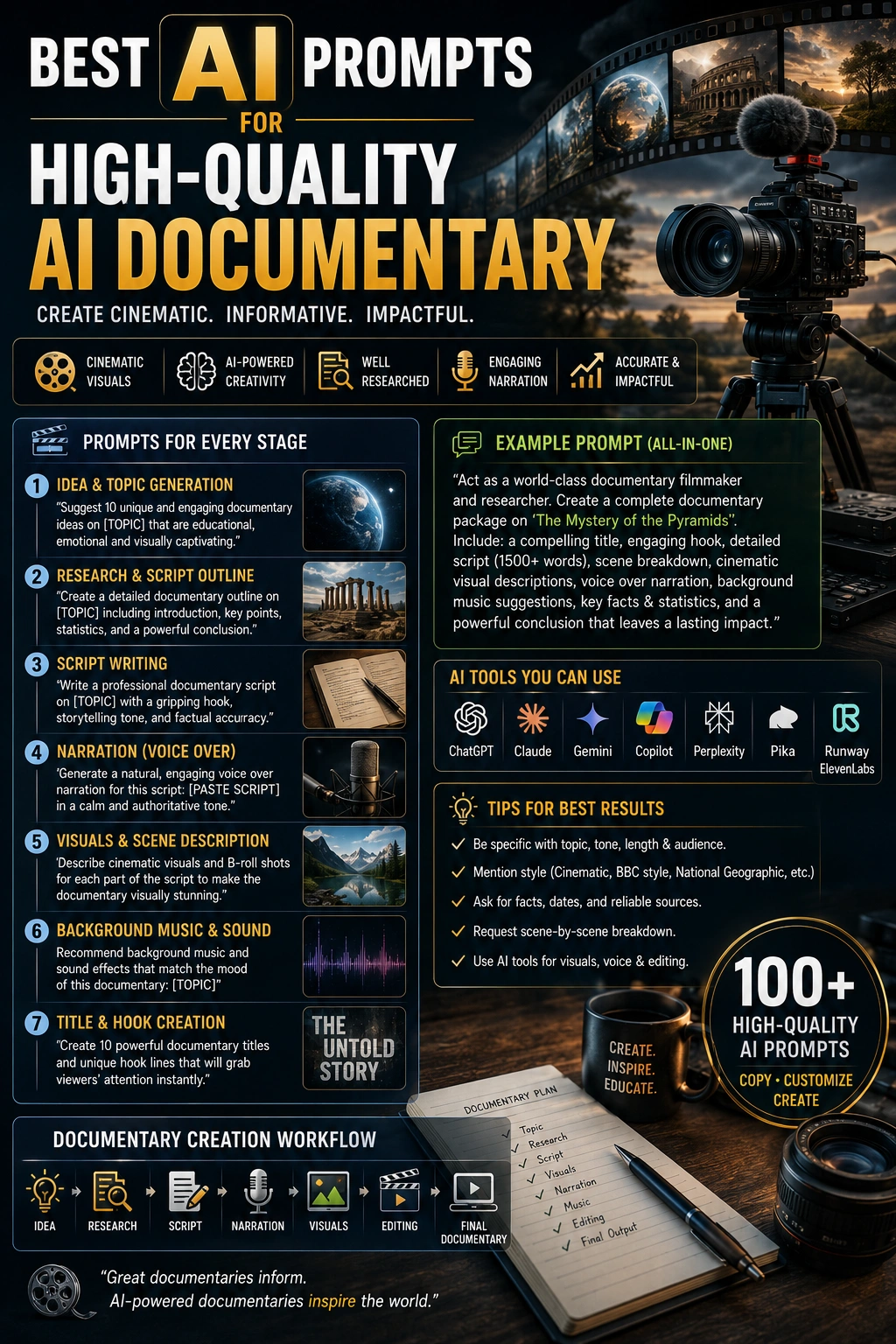
ChatGPT (GPT-4o) / Claude 3.5 Sonnet for scripting; ElevenLabs for voiceover; Midjourney v6 / DALL·E 3 for storyboards; Runway Gen-3 / Sora for video generation where available; Premiere Pro / DaVinci Resolve for editing. Check current tool capabilities, licensing and availability before production.
Quick Implementation Guide
- Input the prompt with the historical context or subject, intended emotional tone, narrator perspective, target audience and scene-by-scene visual descriptions. Require source notes for factual claims.
- Generate the voiceover script and matching cinematic video or storyboard frames with the appropriate text, image, video and audio tools. Verify factual details and mark reconstructions as illustrative.
- Import approved assets into your editor, synchronize narration cadence, score, sound effects and archival transitions, then review continuity, accessibility, permissions and any needed AI-use disclosures before publishing.
Real-World Use Case Example
Create short historical explainers for YouTube, investigative mini-documentaries about emerging technologies, or clearly labeled reconstructions for classroom and museum projects.
2. Mini-Documentary Script (8-15 Minutes)
SCRIPTWrite a tight, story-driven short documentary built for online audiences.
Write a mini-documentary script about [topic] running
[8-15] minutes. Use a two-column format: narration and
interview lines on the left, visuals and sound on the right.
Include a cold open, a clear central question, 3-4 chapters,
one surprising fact or turn per chapter, a human story at the
center rather than only information, and a closing line that
answers the central question. Mark every claim that needs
verification with [verify].
Write a mini-documentary script about [topic] running
[8-15] minutes. Use a two-column format: narration and
interview lines on the left, visuals and sound on the right.
Include a cold open, a clear central question, 3-4 chapters,
one surprising fact or turn per chapter, a human story at the
center rather than only information, and a closing line that
answers the central question. Mark every claim that needs
verification with [verify].
Recommended Tech Stack
ChatGPT (GPT-4o) / Claude 3.5 Sonnet for scripting; ElevenLabs for voiceover; Midjourney v6 / DALL·E 3 for storyboards; Runway Gen-3 / Sora for video generation where available; Premiere Pro / DaVinci Resolve for editing. Check current tool capabilities, licensing and availability before production.
Quick Implementation Guide
- Input the prompt with the historical context or subject, intended emotional tone, narrator perspective, target audience and scene-by-scene visual descriptions. Require source notes for factual claims.
- Generate the voiceover script and matching cinematic video or storyboard frames with the appropriate text, image, video and audio tools. Verify factual details and mark reconstructions as illustrative.
- Import approved assets into your editor, synchronize narration cadence, score, sound effects and archival transitions, then review continuity, accessibility, permissions and any needed AI-use disclosures before publishing.
Real-World Use Case Example
Create short historical explainers for YouTube, investigative mini-documentaries about emerging technologies, or clearly labeled reconstructions for classroom and museum projects.
3. Voiceover Narration Script (Human or AI Voice)
SCRIPTWrite narration that sounds natural when read aloud by a person or an AI voice.
Write a documentary narration script for a segment about
[subtopic] within a larger documentary on [topic]. Use a
measured, authoritative tone, short declarative sentences,
and natural pauses marked with line breaks. Avoid hard-to-say
words, long lists, and abbreviations. Add pronunciation notes
for names and technical terms, and mark where the voice
should slow down or pause. Length: approximately [word count]
words. If an AI voice will be used, add a one-line disclosure
note for the credits.
Write a documentary narration script for a segment about
[subtopic] within a larger documentary on [topic]. Use a
measured, authoritative tone, short declarative sentences,
and natural pauses marked with line breaks. Avoid hard-to-say
words, long lists, and abbreviations. Add pronunciation notes
for names and technical terms, and mark where the voice
should slow down or pause. Length: approximately [word count]
words. If an AI voice will be used, add a one-line disclosure
note for the credits.
Recommended Tech Stack
ChatGPT (GPT-4o) / Claude 3.5 Sonnet for scripting; ElevenLabs for voiceover; Midjourney v6 / DALL·E 3 for storyboards; Runway Gen-3 / Sora for video generation where available; Premiere Pro / DaVinci Resolve for editing. Check current tool capabilities, licensing and availability before production.
Quick Implementation Guide
- Input the prompt with the historical context or subject, intended emotional tone, narrator perspective, target audience and scene-by-scene visual descriptions. Require source notes for factual claims.
- Generate the voiceover script and matching cinematic video or storyboard frames with the appropriate text, image, video and audio tools. Verify factual details and mark reconstructions as illustrative.
- Import approved assets into your editor, synchronize narration cadence, score, sound effects and archival transitions, then review continuity, accessibility, permissions and any needed AI-use disclosures before publishing.
Real-World Use Case Example
Create short historical explainers for YouTube, investigative mini-documentaries about emerging technologies, or clearly labeled reconstructions for classroom and museum projects.
4. Cold Open Hook Writer
SCRIPTWrite an opening that earns the viewer's attention in the first 15 seconds.
Write 5 alternative cold-open hooks (under 50 words each) for
a documentary about [topic]. Use a different approach for each:
a striking image, a surprising fact, a person in the middle of
a decision, an unanswered question, and a contradiction. Each
should raise a question or stake that pulls the viewer in
without giving away the full story. After each hook, suggest
the first visual and the first sound that would accompany it.
Write 5 alternative cold-open hooks (under 50 words each) for
a documentary about [topic]. Use a different approach for each:
a striking image, a surprising fact, a person in the middle of
a decision, an unanswered question, and a contradiction. Each
should raise a question or stake that pulls the viewer in
without giving away the full story. After each hook, suggest
the first visual and the first sound that would accompany it.
Recommended Tech Stack
ChatGPT (GPT-4o) / Claude 3.5 Sonnet for scripting; ElevenLabs for voiceover; Midjourney v6 / DALL·E 3 for storyboards; Runway Gen-3 / Sora for video generation where available; Premiere Pro / DaVinci Resolve for editing. Check current tool capabilities, licensing and availability before production.
Quick Implementation Guide
- Input the prompt with the historical context or subject, intended emotional tone, narrator perspective, target audience and scene-by-scene visual descriptions. Require source notes for factual claims.
- Generate the voiceover script and matching cinematic video or storyboard frames with the appropriate text, image, video and audio tools. Verify factual details and mark reconstructions as illustrative.
- Import approved assets into your editor, synchronize narration cadence, score, sound effects and archival transitions, then review continuity, accessibility, permissions and any needed AI-use disclosures before publishing.
Real-World Use Case Example
Create short historical explainers for YouTube, investigative mini-documentaries about emerging technologies, or clearly labeled reconstructions for classroom and museum projects.
5. Interview Question List Generator (Consent-Aware)
SCRIPTThoughtful interview questions, plus a prompt for the consent conversation expected before any AI processing of the footage.
Generate 12 interview questions for a documentary subject who
is [describe subject's role/relevance to topic].
Include warm-up questions, questions that draw out specific
stories or emotion, and a closing reflective question. Also
draft one plain-language consent note to read to the subject
beforehand, covering whether any AI tools (audio cleanup,
voice isolation, translation, or visual recreation) might be
used on their footage, so consent is informed rather than
assumed.
Generate 12 interview questions for a documentary subject who
is [describe subject's role/relevance to topic].
Include warm-up questions, questions that draw out specific
stories or emotion, and a closing reflective question. Also
draft one plain-language consent note to read to the subject
beforehand, covering whether any AI tools (audio cleanup,
voice isolation, translation, or visual recreation) might be
used on their footage, so consent is informed rather than
assumed.
Recommended Tech Stack
ChatGPT (GPT-4o) / Claude 3.5 Sonnet for scripting; ElevenLabs for voiceover; Midjourney v6 / DALL·E 3 for storyboards; Runway Gen-3 / Sora for video generation where available; Premiere Pro / DaVinci Resolve for editing. Check current tool capabilities, licensing and availability before production.
Quick Implementation Guide
- Input the prompt with the historical context or subject, intended emotional tone, narrator perspective, target audience and scene-by-scene visual descriptions. Require source notes for factual claims.
- Generate the voiceover script and matching cinematic video or storyboard frames with the appropriate text, image, video and audio tools. Verify factual details and mark reconstructions as illustrative.
- Import approved assets into your editor, synchronize narration cadence, score, sound effects and archival transitions, then review continuity, accessibility, permissions and any needed AI-use disclosures before publishing.
Real-World Use Case Example
Create short historical explainers for YouTube, investigative mini-documentaries about emerging technologies, or clearly labeled reconstructions for classroom and museum projects.
6. Chapter/Segment Breakdown with AI-Disclosure Flags
SCRIPTBreak a long documentary into clear chapters, with a flag for which ones will need an AI-use disclosure.
Break a documentary about [topic] into [number] chapters/
segments. For each chapter, provide a title, a one-sentence
summary of its focus, how it connects to the overall
narrative arc, an approximate runtime, and a flag for whether
that chapter is likely to include any AI-generated or
AI-recreated visual/audio material that will need a
disclosure note in the final cut.
Break a documentary about [topic] into [number] chapters/
segments. For each chapter, provide a title, a one-sentence
summary of its focus, how it connects to the overall
narrative arc, an approximate runtime, and a flag for whether
that chapter is likely to include any AI-generated or
AI-recreated visual/audio material that will need a
disclosure note in the final cut.
Recommended Tech Stack
ChatGPT (GPT-4o) / Claude 3.5 Sonnet for scripting; ElevenLabs for voiceover; Midjourney v6 / DALL·E 3 for storyboards; Runway Gen-3 / Sora for video generation where available; Premiere Pro / DaVinci Resolve for editing. Check current tool capabilities, licensing and availability before production.
Quick Implementation Guide
- Input the prompt with the historical context or subject, intended emotional tone, narrator perspective, target audience and scene-by-scene visual descriptions. Require source notes for factual claims.
- Generate the voiceover script and matching cinematic video or storyboard frames with the appropriate text, image, video and audio tools. Verify factual details and mark reconstructions as illustrative.
- Import approved assets into your editor, synchronize narration cadence, score, sound effects and archival transitions, then review continuity, accessibility, permissions and any needed AI-use disclosures before publishing.
Real-World Use Case Example
Create short historical explainers for YouTube, investigative mini-documentaries about emerging technologies, or clearly labeled reconstructions for classroom and museum projects.
7. Fact-Check & Source-Type Research Checklist
SCRIPTVerify every factual claim, and separately track which visuals are real archival material versus AI-created.
Review this documentary script draft: [paste script].
List every factual claim, date, statistic, and quote that needs
to be verified against a reliable source before publishing,
organized in a simple checklist with a suggested source type
for each (primary document, official record, expert, news
archive). Also add a second checklist identifying every
visual described as "archival," "recreated," or "reenacted,"
and flag which of those are real historical material versus
AI-generated or AI-modified, so the audience can always tell
the difference. Do not confirm any fact yourself; only list
what must be checked.
Review this documentary script draft: [paste script].
List every factual claim, date, statistic, and quote that needs
to be verified against a reliable source before publishing,
organized in a simple checklist with a suggested source type
for each (primary document, official record, expert, news
archive). Also add a second checklist identifying every
visual described as "archival," "recreated," or "reenacted,"
and flag which of those are real historical material versus
AI-generated or AI-modified, so the audience can always tell
the difference. Do not confirm any fact yourself; only list
what must be checked.
Recommended Tech Stack
ChatGPT (GPT-4o) / Claude 3.5 Sonnet for scripting; ElevenLabs for voiceover; Midjourney v6 / DALL·E 3 for storyboards; Runway Gen-3 / Sora for video generation where available; Premiere Pro / DaVinci Resolve for editing. Check current tool capabilities, licensing and availability before production.
Quick Implementation Guide
- Input the prompt with the historical context or subject, intended emotional tone, narrator perspective, target audience and scene-by-scene visual descriptions. Require source notes for factual claims.
- Generate the voiceover script and matching cinematic video or storyboard frames with the appropriate text, image, video and audio tools. Verify factual details and mark reconstructions as illustrative.
- Import approved assets into your editor, synchronize narration cadence, score, sound effects and archival transitions, then review continuity, accessibility, permissions and any needed AI-use disclosures before publishing.
Real-World Use Case Example
Create short historical explainers for YouTube, investigative mini-documentaries about emerging technologies, or clearly labeled reconstructions for classroom and museum projects.
8. Documentary Pitch Treatment & Funding One-Pager
SCRIPTTurn an idea into a clear pitch that commissioners, sponsors, and grant panels can say yes to.
Write a one-page documentary pitch treatment for [topic].
Include a logline (under 30 words), why this story matters
now, the main characters and their access, the central
question, a three-act summary, visual and sound approach,
format and runtime, target audience and distribution plan,
a rough production timeline, budget range by category, and a
short statement on how AI tools will and will not be used.
Write in plain, confident language without hype.
Write a one-page documentary pitch treatment for [topic].
Include a logline (under 30 words), why this story matters
now, the main characters and their access, the central
question, a three-act summary, visual and sound approach,
format and runtime, target audience and distribution plan,
a rough production timeline, budget range by category, and a
short statement on how AI tools will and will not be used.
Write in plain, confident language without hype.
Recommended Tech Stack
ChatGPT (GPT-4o) / Claude 3.5 Sonnet for scripting; ElevenLabs for voiceover; Midjourney v6 / DALL·E 3 for storyboards; Runway Gen-3 / Sora for video generation where available; Premiere Pro / DaVinci Resolve for editing. Check current tool capabilities, licensing and availability before production.
Quick Implementation Guide
- Input the prompt with the historical context or subject, intended emotional tone, narrator perspective, target audience and scene-by-scene visual descriptions. Require source notes for factual claims.
- Generate the voiceover script and matching cinematic video or storyboard frames with the appropriate text, image, video and audio tools. Verify factual details and mark reconstructions as illustrative.
- Import approved assets into your editor, synchronize narration cadence, score, sound effects and archival transitions, then review continuity, accessibility, permissions and any needed AI-use disclosures before publishing.
Real-World Use Case Example
Create short historical explainers for YouTube, investigative mini-documentaries about emerging technologies, or clearly labeled reconstructions for classroom and museum projects.
9. Cinematic Establishing Shot & Consistent B-Roll Set
VISUALSA cinematic opening shot plus matching B-roll for a real, non-identifiable location, with one consistent look.
Generate a cinematic establishing shot of [location/scene] for
a documentary about [topic], then 4 matching B-roll shots
that keep the same lighting, color grade, and lens style.
Style: photorealistic, golden hour lighting, wide-angle
composition, subtle film grain, documentary-style color
grading. Describe camera movement for each shot (slow push-in,
static, handheld, aerial), and list ambient sounds that should
accompany each one.
Generate a cinematic establishing shot of [location/scene] for
a documentary about [topic], then 4 matching B-roll shots
that keep the same lighting, color grade, and lens style.
Style: photorealistic, golden hour lighting, wide-angle
composition, subtle film grain, documentary-style color
grading. Describe camera movement for each shot (slow push-in,
static, handheld, aerial), and list ambient sounds that should
accompany each one.
Recommended Tech Stack
ChatGPT (GPT-4o) / Claude 3.5 Sonnet for scripting; ElevenLabs for voiceover; Midjourney v6 / DALL·E 3 for storyboards; Runway Gen-3 / Sora for video generation where available; Premiere Pro / DaVinci Resolve for editing. Check current tool capabilities, licensing and availability before production.
Quick Implementation Guide
- Input the prompt with the historical context or subject, intended emotional tone, narrator perspective, target audience and scene-by-scene visual descriptions. Require source notes for factual claims.
- Generate the voiceover script and matching cinematic video or storyboard frames with the appropriate text, image, video and audio tools. Verify factual details and mark reconstructions as illustrative.
- Import approved assets into your editor, synchronize narration cadence, score, sound effects and archival transitions, then review continuity, accessibility, permissions and any needed AI-use disclosures before publishing.
Real-World Use Case Example
Create short historical explainers for YouTube, investigative mini-documentaries about emerging technologies, or clearly labeled reconstructions for classroom and museum projects.
10. Period Atmosphere Visual (Clearly Labeled Recreation)
VISUALSA vintage-style visual for general period atmosphere, created with the understanding that it must never be mistaken for real archival material.
Create a period-atmosphere visual of [a general,
non-identifiable scene or era, not a specific real historical
event or named real person] set in [era/decade]. Include
period-accurate clothing and setting, desaturated tones, slight
film grain, and a 4:3 aspect ratio to evoke the look of the
time. This must be used only for general atmosphere, never to
fabricate documentation of a real event or real person, and it
must carry an on-screen label such as "Artist's recreation"
whenever it appears near real archival material.
Create a period-atmosphere visual of [a general,
non-identifiable scene or era, not a specific real historical
event or named real person] set in [era/decade]. Include
period-accurate clothing and setting, desaturated tones, slight
film grain, and a 4:3 aspect ratio to evoke the look of the
time. This must be used only for general atmosphere, never to
fabricate documentation of a real event or real person, and it
must carry an on-screen label such as "Artist's recreation"
whenever it appears near real archival material.
Recommended Tech Stack
ChatGPT (GPT-4o) / Claude 3.5 Sonnet for scripting; ElevenLabs for voiceover; Midjourney v6 / DALL·E 3 for storyboards; Runway Gen-3 / Sora for video generation where available; Premiere Pro / DaVinci Resolve for editing. Check current tool capabilities, licensing and availability before production.
Quick Implementation Guide
- Input the prompt with the historical context or subject, intended emotional tone, narrator perspective, target audience and scene-by-scene visual descriptions. Require source notes for factual claims.
- Generate the voiceover script and matching cinematic video or storyboard frames with the appropriate text, image, video and audio tools. Verify factual details and mark reconstructions as illustrative.
- Import approved assets into your editor, synchronize narration cadence, score, sound effects and archival transitions, then review continuity, accessibility, permissions and any needed AI-use disclosures before publishing.
Real-World Use Case Example
Create short historical explainers for YouTube, investigative mini-documentaries about emerging technologies, or clearly labeled reconstructions for classroom and museum projects.
11. Multilingual & Vertical Release Plan
SCRIPTPlan how one documentary becomes subtitled, dubbed, and short vertical episodes for new audiences.
Create a release plan for a finished [runtime]-minute
documentary about [topic]. Include: 1) subtitle languages to
prioritize and the review process for accuracy, 2) whether to
dub or subtitle each language, with a note on consent for any
voice cloning, 3) a plan to cut the film into 6-10 vertical
episodes of 60-90 seconds with a hook and cliffhanger for
each, 4) titles and thumbnails for each platform, 5) a
disclosure line for any AI-assisted translation or voice, and
6) a two-week posting schedule.
Create a release plan for a finished [runtime]-minute
documentary about [topic]. Include: 1) subtitle languages to
prioritize and the review process for accuracy, 2) whether to
dub or subtitle each language, with a note on consent for any
voice cloning, 3) a plan to cut the film into 6-10 vertical
episodes of 60-90 seconds with a hook and cliffhanger for
each, 4) titles and thumbnails for each platform, 5) a
disclosure line for any AI-assisted translation or voice, and
6) a two-week posting schedule.
Recommended Tech Stack
ChatGPT (GPT-4o) / Claude 3.5 Sonnet for scripting; ElevenLabs for voiceover; Midjourney v6 / DALL·E 3 for storyboards; Runway Gen-3 / Sora for video generation where available; Premiere Pro / DaVinci Resolve for editing. Check current tool capabilities, licensing and availability before production.
Quick Implementation Guide
- Input the prompt with the historical context or subject, intended emotional tone, narrator perspective, target audience and scene-by-scene visual descriptions. Require source notes for factual claims.
- Generate the voiceover script and matching cinematic video or storyboard frames with the appropriate text, image, video and audio tools. Verify factual details and mark reconstructions as illustrative.
- Import approved assets into your editor, synchronize narration cadence, score, sound effects and archival transitions, then review continuity, accessibility, permissions and any needed AI-use disclosures before publishing.
Real-World Use Case Example
Create short historical explainers for YouTube, investigative mini-documentaries about emerging technologies, or clearly labeled reconstructions for classroom and museum projects.
12. Macro Detail Shot Prompt
VISUALSClose-up detail shots that add texture and grounding to a scene.
Generate a macro close-up shot of [object/detail relevant to
topic], with shallow depth of field, natural lighting, and
fine texture detail. Style: high-resolution documentary
B-roll, no text overlays.
Generate a macro close-up shot of [object/detail relevant to
topic], with shallow depth of field, natural lighting, and
fine texture detail. Style: high-resolution documentary
B-roll, no text overlays.
Recommended Tech Stack
ChatGPT (GPT-4o) / Claude 3.5 Sonnet for scripting; ElevenLabs for voiceover; Midjourney v6 / DALL·E 3 for storyboards; Runway Gen-3 / Sora for video generation where available; Premiere Pro / DaVinci Resolve for editing. Check current tool capabilities, licensing and availability before production.
Quick Implementation Guide
- Input the prompt with the historical context or subject, intended emotional tone, narrator perspective, target audience and scene-by-scene visual descriptions. Require source notes for factual claims.
- Generate the voiceover script and matching cinematic video or storyboard frames with the appropriate text, image, video and audio tools. Verify factual details and mark reconstructions as illustrative.
- Import approved assets into your editor, synchronize narration cadence, score, sound effects and archival transitions, then review continuity, accessibility, permissions and any needed AI-use disclosures before publishing.
Real-World Use Case Example
Create short historical explainers for YouTube, investigative mini-documentaries about emerging technologies, or clearly labeled reconstructions for classroom and museum projects.
13. Aerial/Drone Shot Concept
VISUALSA sweeping aerial visual to convey scale and scope.
Generate an aerial drone-style shot of [location] to convey
scale for a documentary about [topic]. Include natural
lighting appropriate to [time of day], realistic terrain
detail, and a slow, sweeping camera movement feel.
Generate an aerial drone-style shot of [location] to convey
scale for a documentary about [topic]. Include natural
lighting appropriate to [time of day], realistic terrain
detail, and a slow, sweeping camera movement feel.
Recommended Tech Stack
ChatGPT (GPT-4o) / Claude 3.5 Sonnet for scripting; ElevenLabs for voiceover; Midjourney v6 / DALL·E 3 for storyboards; Runway Gen-3 / Sora for video generation where available; Premiere Pro / DaVinci Resolve for editing. Check current tool capabilities, licensing and availability before production.
Quick Implementation Guide
- Input the prompt with the historical context or subject, intended emotional tone, narrator perspective, target audience and scene-by-scene visual descriptions. Require source notes for factual claims.
- Generate the voiceover script and matching cinematic video or storyboard frames with the appropriate text, image, video and audio tools. Verify factual details and mark reconstructions as illustrative.
- Import approved assets into your editor, synchronize narration cadence, score, sound effects and archival transitions, then review continuity, accessibility, permissions and any needed AI-use disclosures before publishing.
Real-World Use Case Example
Create short historical explainers for YouTube, investigative mini-documentaries about emerging technologies, or clearly labeled reconstructions for classroom and museum projects.
14. Infographic/Data Visualization Style Frame
VISUALSA clean motion-graphic style frame for presenting a data point.
Design a documentary-style infographic frame presenting
[data point/statistic] about [topic]. Style: minimal, clean
typography, subtle motion-graphic feel, muted color palette
consistent with a serious documentary tone.
Design a documentary-style infographic frame presenting
[data point/statistic] about [topic]. Style: minimal, clean
typography, subtle motion-graphic feel, muted color palette
consistent with a serious documentary tone.
Recommended Tech Stack
ChatGPT (GPT-4o) / Claude 3.5 Sonnet for scripting; ElevenLabs for voiceover; Midjourney v6 / DALL·E 3 for storyboards; Runway Gen-3 / Sora for video generation where available; Premiere Pro / DaVinci Resolve for editing. Check current tool capabilities, licensing and availability before production.
Quick Implementation Guide
- Input the prompt with the historical context or subject, intended emotional tone, narrator perspective, target audience and scene-by-scene visual descriptions. Require source notes for factual claims.
- Generate the voiceover script and matching cinematic video or storyboard frames with the appropriate text, image, video and audio tools. Verify factual details and mark reconstructions as illustrative.
- Import approved assets into your editor, synchronize narration cadence, score, sound effects and archival transitions, then review continuity, accessibility, permissions and any needed AI-use disclosures before publishing.
Real-World Use Case Example
Create short historical explainers for YouTube, investigative mini-documentaries about emerging technologies, or clearly labeled reconstructions for classroom and museum projects.
15. Observational Recreation Concept (Non-Intrusive, Disclosed)
VISUALSReenactment reframed around 2026's dominant true-crime standard: observational restraint, victim respect, and disclosed AI use.
Generate a documentary-style recreation concept suggesting
[historical event/moment] without depicting identifiable real
individuals: use silhouette, shadow, blurred focus, or an
empty-room/object-focused framing that implies the moment
rather than staging identifiable faces. Style: muted tones,
dramatic but restrained lighting, observational rather than
dramatized. If the event involves real victims or living
people, favor an observational approach (letting testimony
and evidence carry the scene) over a staged reenactment
entirely, and note that if any AI-generated imagery is used
here, it must be disclosed to the viewer per current
documentary AI-ethics standards (PBS/POV and Sundance's
Nonfiction Core Application both now require this).
Generate a documentary-style recreation concept suggesting
[historical event/moment] without depicting identifiable real
individuals: use silhouette, shadow, blurred focus, or an
empty-room/object-focused framing that implies the moment
rather than staging identifiable faces. Style: muted tones,
dramatic but restrained lighting, observational rather than
dramatized. If the event involves real victims or living
people, favor an observational approach (letting testimony
and evidence carry the scene) over a staged reenactment
entirely, and note that if any AI-generated imagery is used
here, it must be disclosed to the viewer per current
documentary AI-ethics standards (PBS/POV and Sundance's
Nonfiction Core Application both now require this).
Recommended Tech Stack
ChatGPT (GPT-4o) / Claude 3.5 Sonnet for scripting; ElevenLabs for voiceover; Midjourney v6 / DALL·E 3 for storyboards; Runway Gen-3 / Sora for video generation where available; Premiere Pro / DaVinci Resolve for editing. Check current tool capabilities, licensing and availability before production.
Quick Implementation Guide
- Input the prompt with the historical context or subject, intended emotional tone, narrator perspective, target audience and scene-by-scene visual descriptions. Require source notes for factual claims.
- Generate the voiceover script and matching cinematic video or storyboard frames with the appropriate text, image, video and audio tools. Verify factual details and mark reconstructions as illustrative.
- Import approved assets into your editor, synchronize narration cadence, score, sound effects and archival transitions, then review continuity, accessibility, permissions and any needed AI-use disclosures before publishing.
Real-World Use Case Example
Create short historical explainers for YouTube, investigative mini-documentaries about emerging technologies, or clearly labeled reconstructions for classroom and museum projects.
16. AI-Use Disclosure & Labeling Plan
SCRIPTDraft the actual on-screen and supplemental disclosure language now expected industry-wide when a documentary uses generative AI.
Draft an AI-use disclosure plan for a documentary about
[topic] that used [describe AI use, e.g. AI-recreated
archival visuals, AI-cleaned audio, AI-generated B-roll].
Include: a lower-third on-screen label to use at the moment
the AI-generated material appears, a closing-credits
disclosure statement summarizing all AI use in the film, a
short supplemental note (for the film's website or press kit)
explaining which tools were used and why, and language
confirming that no AI-generated material was presented as
genuine archival evidence. Model the tone on PBS/POV's
published AI-disclosure guidelines: informative and
confidence-building for the audience, not defensive.
Draft an AI-use disclosure plan for a documentary about
[topic] that used [describe AI use, e.g. AI-recreated
archival visuals, AI-cleaned audio, AI-generated B-roll].
Include: a lower-third on-screen label to use at the moment
the AI-generated material appears, a closing-credits
disclosure statement summarizing all AI use in the film, a
short supplemental note (for the film's website or press kit)
explaining which tools were used and why, and language
confirming that no AI-generated material was presented as
genuine archival evidence. Model the tone on PBS/POV's
published AI-disclosure guidelines: informative and
confidence-building for the audience, not defensive.
Recommended Tech Stack
ChatGPT (GPT-4o) / Claude 3.5 Sonnet for scripting; ElevenLabs for voiceover; Midjourney v6 / DALL·E 3 for storyboards; Runway Gen-3 / Sora for video generation where available; Premiere Pro / DaVinci Resolve for editing. Check current tool capabilities, licensing and availability before production.
Quick Implementation Guide
- Input the prompt with the historical context or subject, intended emotional tone, narrator perspective, target audience and scene-by-scene visual descriptions. Require source notes for factual claims.
- Generate the voiceover script and matching cinematic video or storyboard frames with the appropriate text, image, video and audio tools. Verify factual details and mark reconstructions as illustrative.
- Import approved assets into your editor, synchronize narration cadence, score, sound effects and archival transitions, then review continuity, accessibility, permissions and any needed AI-use disclosures before publishing.
Real-World Use Case Example
Create short historical explainers for YouTube, investigative mini-documentaries about emerging technologies, or clearly labeled reconstructions for classroom and museum projects.
17. Voiceover Delivery Direction Notes
PRODUCTIONDirect tone, pacing, and emphasis for a narrator's read.
Write voiceover delivery notes for this narration line: [paste
line]. Indicate where the narrator should pause, which words to
emphasize, and the overall emotional tone (e.g. somber,
curious, hopeful) for this specific line.
Write voiceover delivery notes for this narration line: [paste
line]. Indicate where the narrator should pause, which words to
emphasize, and the overall emotional tone (e.g. somber,
curious, hopeful) for this specific line.
Recommended Tech Stack
ChatGPT (GPT-4o) / Claude 3.5 Sonnet for scripting; ElevenLabs for voiceover; Midjourney v6 / DALL·E 3 for storyboards; Runway Gen-3 / Sora for video generation where available; Premiere Pro / DaVinci Resolve for editing. Check current tool capabilities, licensing and availability before production.
Quick Implementation Guide
- Input the prompt with the historical context or subject, intended emotional tone, narrator perspective, target audience and scene-by-scene visual descriptions. Require source notes for factual claims.
- Generate the voiceover script and matching cinematic video or storyboard frames with the appropriate text, image, video and audio tools. Verify factual details and mark reconstructions as illustrative.
- Import approved assets into your editor, synchronize narration cadence, score, sound effects and archival transitions, then review continuity, accessibility, permissions and any needed AI-use disclosures before publishing.
Real-World Use Case Example
Create short historical explainers for YouTube, investigative mini-documentaries about emerging technologies, or clearly labeled reconstructions for classroom and museum projects.
18. Music & Score Mood Brief
PRODUCTIONDescribe the mood and style for a documentary's score.
Write a music mood brief for the score of a documentary about
[topic]. Describe the instrumentation, tempo, and emotional
arc needed across the film's [number] key sections, referencing
comparable documentary scores for tone.
Write a music mood brief for the score of a documentary about
[topic]. Describe the instrumentation, tempo, and emotional
arc needed across the film's [number] key sections, referencing
comparable documentary scores for tone.
Recommended Tech Stack
ChatGPT (GPT-4o) / Claude 3.5 Sonnet for scripting; ElevenLabs for voiceover; Midjourney v6 / DALL·E 3 for storyboards; Runway Gen-3 / Sora for video generation where available; Premiere Pro / DaVinci Resolve for editing. Check current tool capabilities, licensing and availability before production.
Quick Implementation Guide
- Input the prompt with the historical context or subject, intended emotional tone, narrator perspective, target audience and scene-by-scene visual descriptions. Require source notes for factual claims.
- Generate the voiceover script and matching cinematic video or storyboard frames with the appropriate text, image, video and audio tools. Verify factual details and mark reconstructions as illustrative.
- Import approved assets into your editor, synchronize narration cadence, score, sound effects and archival transitions, then review continuity, accessibility, permissions and any needed AI-use disclosures before publishing.
Real-World Use Case Example
Create short historical explainers for YouTube, investigative mini-documentaries about emerging technologies, or clearly labeled reconstructions for classroom and museum projects.
19. B-Roll Shot List Generator
PRODUCTIONPlan a shot list of supporting B-roll visuals.
Generate a B-roll shot list to support a narration segment
about [subtopic]. Include 10 specific shot ideas (wide, medium,
close-up) that visually reinforce the narration without
literally illustrating every sentence.
Generate a B-roll shot list to support a narration segment
about [subtopic]. Include 10 specific shot ideas (wide, medium,
close-up) that visually reinforce the narration without
literally illustrating every sentence.
Recommended Tech Stack
ChatGPT (GPT-4o) / Claude 3.5 Sonnet for scripting; ElevenLabs for voiceover; Midjourney v6 / DALL·E 3 for storyboards; Runway Gen-3 / Sora for video generation where available; Premiere Pro / DaVinci Resolve for editing. Check current tool capabilities, licensing and availability before production.
Quick Implementation Guide
- Input the prompt with the historical context or subject, intended emotional tone, narrator perspective, target audience and scene-by-scene visual descriptions. Require source notes for factual claims.
- Generate the voiceover script and matching cinematic video or storyboard frames with the appropriate text, image, video and audio tools. Verify factual details and mark reconstructions as illustrative.
- Import approved assets into your editor, synchronize narration cadence, score, sound effects and archival transitions, then review continuity, accessibility, permissions and any needed AI-use disclosures before publishing.
Real-World Use Case Example
Create short historical explainers for YouTube, investigative mini-documentaries about emerging technologies, or clearly labeled reconstructions for classroom and museum projects.
20. Title & Thumbnail Concept Generator
PRODUCTIONGenerate compelling, accurate titles and thumbnail ideas.
Generate 8 documentary title options for a film about [topic],
plus 3 thumbnail visual concepts. Titles should be intriguing
but accurate to the content, avoiding clickbait that
misrepresents the film.
Generate 8 documentary title options for a film about [topic],
plus 3 thumbnail visual concepts. Titles should be intriguing
but accurate to the content, avoiding clickbait that
misrepresents the film.
Recommended Tech Stack
ChatGPT (GPT-4o) / Claude 3.5 Sonnet for scripting; ElevenLabs for voiceover; Midjourney v6 / DALL·E 3 for storyboards; Runway Gen-3 / Sora for video generation where available; Premiere Pro / DaVinci Resolve for editing. Check current tool capabilities, licensing and availability before production.
Quick Implementation Guide
- Input the prompt with the historical context or subject, intended emotional tone, narrator perspective, target audience and scene-by-scene visual descriptions. Require source notes for factual claims.
- Generate the voiceover script and matching cinematic video or storyboard frames with the appropriate text, image, video and audio tools. Verify factual details and mark reconstructions as illustrative.
- Import approved assets into your editor, synchronize narration cadence, score, sound effects and archival transitions, then review continuity, accessibility, permissions and any needed AI-use disclosures before publishing.
Real-World Use Case Example
Create short historical explainers for YouTube, investigative mini-documentaries about emerging technologies, or clearly labeled reconstructions for classroom and museum projects.
21. Chapter Timestamp & Description Writer
PRODUCTIONWrite clear chapter markers and video descriptions.
Write YouTube chapter timestamps and a short description for
each chapter of a documentary about [topic] with segments:
[list segment names]. Keep each chapter description under
15 words, clear and specific.
Write YouTube chapter timestamps and a short description for
each chapter of a documentary about [topic] with segments:
[list segment names]. Keep each chapter description under
15 words, clear and specific.
Recommended Tech Stack
ChatGPT (GPT-4o) / Claude 3.5 Sonnet for scripting; ElevenLabs for voiceover; Midjourney v6 / DALL·E 3 for storyboards; Runway Gen-3 / Sora for video generation where available; Premiere Pro / DaVinci Resolve for editing. Check current tool capabilities, licensing and availability before production.
Quick Implementation Guide
- Input the prompt with the historical context or subject, intended emotional tone, narrator perspective, target audience and scene-by-scene visual descriptions. Require source notes for factual claims.
- Generate the voiceover script and matching cinematic video or storyboard frames with the appropriate text, image, video and audio tools. Verify factual details and mark reconstructions as illustrative.
- Import approved assets into your editor, synchronize narration cadence, score, sound effects and archival transitions, then review continuity, accessibility, permissions and any needed AI-use disclosures before publishing.
Real-World Use Case Example
Create short historical explainers for YouTube, investigative mini-documentaries about emerging technologies, or clearly labeled reconstructions for classroom and museum projects.
22. Source Citation & Credits Organizer
PRODUCTIONOrganize sources and credits for transparency.
Create a source citation and credits list template for a
documentary about [topic], covering research sources, archival
footage/photo credits, interview subjects, and music
attribution, formatted for the end-credits sequence.
Create a source citation and credits list template for a
documentary about [topic], covering research sources, archival
footage/photo credits, interview subjects, and music
attribution, formatted for the end-credits sequence.
Recommended Tech Stack
ChatGPT (GPT-4o) / Claude 3.5 Sonnet for scripting; ElevenLabs for voiceover; Midjourney v6 / DALL·E 3 for storyboards; Runway Gen-3 / Sora for video generation where available; Premiere Pro / DaVinci Resolve for editing. Check current tool capabilities, licensing and availability before production.
Quick Implementation Guide
- Input the prompt with the historical context or subject, intended emotional tone, narrator perspective, target audience and scene-by-scene visual descriptions. Require source notes for factual claims.
- Generate the voiceover script and matching cinematic video or storyboard frames with the appropriate text, image, video and audio tools. Verify factual details and mark reconstructions as illustrative.
- Import approved assets into your editor, synchronize narration cadence, score, sound effects and archival transitions, then review continuity, accessibility, permissions and any needed AI-use disclosures before publishing.
Real-World Use Case Example
Create short historical explainers for YouTube, investigative mini-documentaries about emerging technologies, or clearly labeled reconstructions for classroom and museum projects.
23. Trailer Script Draft
PRODUCTIONWrite a short, punchy trailer script to promote the documentary.
Write a 30-second trailer script for a documentary about
[topic]. Include a striking opening line, 3 quick teaser beats
hinting at the story without spoiling it, and a closing line
that drives viewers to watch the full film.
Write a 30-second trailer script for a documentary about
[topic]. Include a striking opening line, 3 quick teaser beats
hinting at the story without spoiling it, and a closing line
that drives viewers to watch the full film.
Recommended Tech Stack
ChatGPT (GPT-4o) / Claude 3.5 Sonnet for scripting; ElevenLabs for voiceover; Midjourney v6 / DALL·E 3 for storyboards; Runway Gen-3 / Sora for video generation where available; Premiere Pro / DaVinci Resolve for editing. Check current tool capabilities, licensing and availability before production.
Quick Implementation Guide
- Input the prompt with the historical context or subject, intended emotional tone, narrator perspective, target audience and scene-by-scene visual descriptions. Require source notes for factual claims.
- Generate the voiceover script and matching cinematic video or storyboard frames with the appropriate text, image, video and audio tools. Verify factual details and mark reconstructions as illustrative.
- Import approved assets into your editor, synchronize narration cadence, score, sound effects and archival transitions, then review continuity, accessibility, permissions and any needed AI-use disclosures before publishing.
Real-World Use Case Example
Create short historical explainers for YouTube, investigative mini-documentaries about emerging technologies, or clearly labeled reconstructions for classroom and museum projects.
24. Expert Quote Contextualizer
SCRIPTWeave an expert quote naturally into the narration.
Help me write a smooth narration transition into this expert
quote: [paste quote], spoken by [name/role].
Introduce who they are, why their perspective matters here,
and connect it back to the surrounding narrative.
Help me write a smooth narration transition into this expert
quote: [paste quote], spoken by [name/role].
Introduce who they are, why their perspective matters here,
and connect it back to the surrounding narrative.
Recommended Tech Stack
ChatGPT (GPT-4o) / Claude 3.5 Sonnet for scripting; ElevenLabs for voiceover; Midjourney v6 / DALL·E 3 for storyboards; Runway Gen-3 / Sora for video generation where available; Premiere Pro / DaVinci Resolve for editing. Check current tool capabilities, licensing and availability before production.
Quick Implementation Guide
- Input the prompt with the historical context or subject, intended emotional tone, narrator perspective, target audience and scene-by-scene visual descriptions. Require source notes for factual claims.
- Generate the voiceover script and matching cinematic video or storyboard frames with the appropriate text, image, video and audio tools. Verify factual details and mark reconstructions as illustrative.
- Import approved assets into your editor, synchronize narration cadence, score, sound effects and archival transitions, then review continuity, accessibility, permissions and any needed AI-use disclosures before publishing.
Real-World Use Case Example
Create short historical explainers for YouTube, investigative mini-documentaries about emerging technologies, or clearly labeled reconstructions for classroom and museum projects.
25. Split-Screen Comparison Visual
VISUALSDesign a side-by-side comparison frame for contrast.
Design a split-screen comparison visual contrasting
[subject A] and [subject B] relevant to [topic].
Style: consistent lighting and framing on both sides, clean
dividing line, documentary color grading for direct visual
comparison.
Design a split-screen comparison visual contrasting
[subject A] and [subject B] relevant to [topic].
Style: consistent lighting and framing on both sides, clean
dividing line, documentary color grading for direct visual
comparison.
Recommended Tech Stack
ChatGPT (GPT-4o) / Claude 3.5 Sonnet for scripting; ElevenLabs for voiceover; Midjourney v6 / DALL·E 3 for storyboards; Runway Gen-3 / Sora for video generation where available; Premiere Pro / DaVinci Resolve for editing. Check current tool capabilities, licensing and availability before production.
Quick Implementation Guide
- Input the prompt with the historical context or subject, intended emotional tone, narrator perspective, target audience and scene-by-scene visual descriptions. Require source notes for factual claims.
- Generate the voiceover script and matching cinematic video or storyboard frames with the appropriate text, image, video and audio tools. Verify factual details and mark reconstructions as illustrative.
- Import approved assets into your editor, synchronize narration cadence, score, sound effects and archival transitions, then review continuity, accessibility, permissions and any needed AI-use disclosures before publishing.
Real-World Use Case Example
Create short historical explainers for YouTube, investigative mini-documentaries about emerging technologies, or clearly labeled reconstructions for classroom and museum projects.
Optimizing Your AI Documentary Production Workflow
Use AI to accelerate planning, not to replace reporting. Start with a clear research question, define the intended audience and runtime, and assemble a source log before drafting narration. Build a production brief that separates verified facts, expert interpretation, creative reconstruction and material that still needs verification.
Work in stages: research and source checking, outline, script, storyboard, voice and sound design, shot generation, edit, then a final factual and rights review. Keep a versioned asset log with prompt text, tool, generation date, source references and any edits. This makes revisions easier and helps the team identify synthetic material.
Step-by-Step Guide: Generating Script Narratives and Visual Storyboards from Prompts
- Define the story question. Give the model the subject, audience, runtime, point of view, tone and what the documentary must establish. Ask for a thesis, chapter outline and a list of claims requiring sources.
- Draft and verify the narration. Generate a scene-by-scene script with narration, interview moments, on-screen text and source notes. Verify dates, quotes, statistics and causal claims against credible primary or authoritative sources before treating them as facts.
- Storyboard each scene. Specify shot type, subject, action, location, period, lighting, camera movement, aspect ratio and transition. Mark whether each shot should use licensed archival footage, newly filmed footage, illustrative imagery or an AI reconstruction.
- Generate, review and edit. Create selected frames or video clips, compare them against the storyboard, then edit around the verified narrative. Keep labels and disclosures for reconstructed or synthetic scenes where viewers could mistake them for real footage.
The Science Behind Cinematic AI Video Generation and Voice Synthesis Prompts
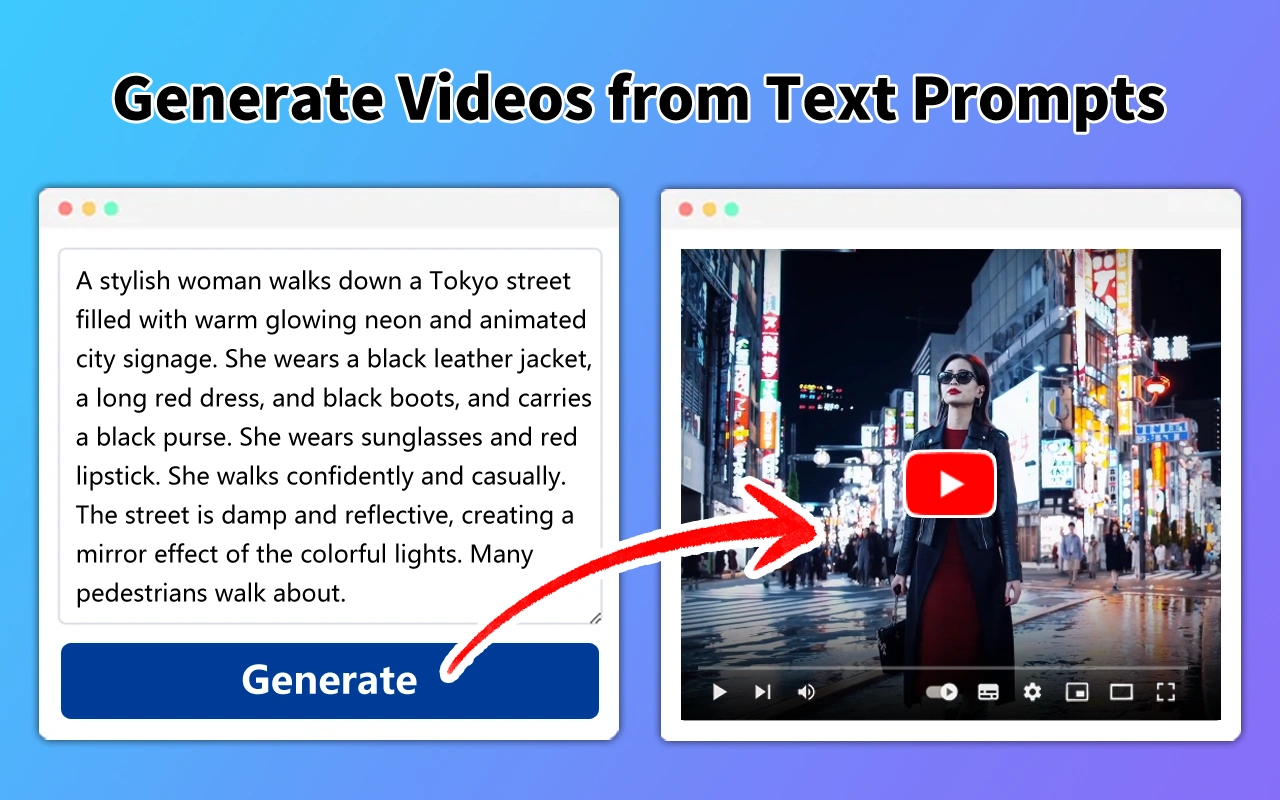
Reliable visual prompts describe observable choices rather than vague adjectives: framing, lens feel, camera movement, light direction, contrast, palette, atmosphere, subject action and clip duration. Reuse a compact style sheet and character/location references across shots, and generate short clips when precise continuity matters.
For voice synthesis, specify narrator age range only when relevant, vocal texture, pace, emotional restraint, pronunciation notes, pauses and emphasis. Test a short sample before generating a full narration, and keep music and effects below speech. Obtain appropriate permission before cloning or imitating an identifiable person's voice, and do not present synthetic speech as a real interview recording.
Best Practices for Maintaining Historical Accuracy and Visual Continuity in AI Documentaries
Maintain a claim ledger that links each factual statement to a source, its publication date and the verification status. Use primary records where possible, corroborate important claims independently, preserve quotation context and clearly distinguish established evidence from disputed interpretations. Never ask a generative model to invent a citation or fill a research gap with a plausible-sounding detail.
For historical visuals, check clothing, tools, architecture, maps, flags, typography and geography against period-specific references. Label illustrative reconstructions and avoid implying that generated scenes are authentic archival footage. Maintain continuity notes for faces, wardrobe, props, lighting, lens style, color grade and screen direction; review the final edit for accidental changes between adjacent shots.
Unlocking Advanced Archival Reconstruction and Deep-Dive Investigative Storytelling with Expert Prompts
For archival reconstruction, first document what is known, what is uncertain and which visual details are inferred. Use AI to create clearly identified illustrative scenes, restoration plans, shot lists or alternative explanations—not to fabricate evidence, documents, quotations or footage and pass them off as genuine. Preserve original archival files and record every restoration or generative alteration.
For investigative projects, build a timeline, source matrix, stakeholder map and competing-hypothesis checklist. Ask prompts to identify unanswered questions and possible counter-evidence, then verify those leads independently. Seek responses from relevant parties, protect confidential sources, respect privacy and defamation laws, and have a qualified editor review sensitive claims before publication.
AI Prompt Templates for High-Quality AI Documentaries
Use these AI prompt templates to structure narration scripts, generate cinematic and archival-style visuals, and plan production details like music, B-roll, and credits. These prompts are designed to help creators produce polished, engaging documentary content while keeping facts accurate and properly sourced.
How Can AI Prompts Improve AI Documentary Production?
AI prompts improve AI documentary production by helping structure a compelling story arc, draft narration that fits a documentary tone, and generate cinematic or archival-style visuals to match the narrative. They also help organize B-roll planning, music briefs, and source citations so the final piece is both engaging and well-documented.

Frequently Asked Questions
What was updated on this page for Oct 2026?
This page was refreshed on Oct 15, 2026 with updated prompt wording, cleaner formatting, and improved guidance so readers can quickly find the most useful AI prompt templates.
What are AI prompts for high-quality AI documentaries?
AI prompts for AI documentaries are text instructions that help AI generate narration scripts, cinematic visuals, and structured storylines for documentary-style content.
Can AI prompts help write a documentary narration script?
Yes. AI prompts can structure a narration arc, tone, and pacing for a documentary script based on real research and sourced facts.
Are these prompts beginner-friendly?
Yes. Beginners can use these prompts to plan and produce documentary-style content without prior filmmaking experience.
Which AI tools work best for documentary prompts?
These prompts work well with tools like ChatGPT and Claude for scripts, and Midjourney, Runway, or other AI video/image tools for visuals.
Should AI-generated documentary content be fact-checked?
Yes. All factual claims, dates, and quotes in a documentary should be verified against reliable sources before publishing, since AI can make mistakes.